在pull远程主分支代码时,出现了如下错误:
|
1 2 |
git-lfs filter-process: git-lfs: command not found fatal: The remote end hung up unexpectedly |
解决方案
|
1 |
$ brew install git-lfs |
Mac是苹果自1984年起以“Macintosh”开始的个人消费型计算机,如:iMac、Mac mini、Macbook air、Macbook pro、Mac pro等计算机。使用独立的Mac os系统,最新的OS X系列基于NeXT系统开发,不支持兼容。是一套完备而独立的生态系统。
在pull远程主分支代码时,出现了如下错误:
|
1 2 |
git-lfs filter-process: git-lfs: command not found fatal: The remote end hung up unexpectedly |
解决方案
|
1 |
$ brew install git-lfs |
macOS使用XQuartz实现X11相关的API,需要卸载的时候,执行如下命令即可:
|
1 2 3 4 5 |
$ sudo launchctl unload /Library/LaunchDaemons/org.macosforge.xquartz.privileged_startx.plist $ sudo rm -rf /opt/X11* /Library/Launch*/org.macosforge.xquartz.* /Applications/Utilities/XQuartz.app /etc/*paths.d/*XQuartz $ sudo pkgutil --forget org.macosforge.xquartz.pkg |
对于CUDA 8.0建议优先执行/Developer/NVIDIA/CUDA-8.0/bin/uninstall_cuda_8.0.pl,进行卸载操作。
对于CUDA 9.0建议优先执行/Developer/NVIDIA/CUDA-9.0/bin/uninstall_cuda_9.0.pl,进行卸载操作。
当执行上面的脚本失败的时候,删除以下两个文件路径即可卸载该驱动:
|
1 2 |
/usr/local/cuda /Library/Frameworks/CUDA.framework |
默认情况下,macOS Catalina的应用程序,必须交由苹果进行一系列安全认证,否则会在默认情况下被阻止运行。未经过安全认证的应用运行的时候,会弹出如下提示:
在使用SSH客户端进行连接管理的时候如果长时间不输入命令, 服务器会自动断开连接, macOS Mojave(10.14.6) 系统上问题比较严重,即时服务端一直发送数据,也会出现连接中断的情况,导致长时间执行的远程 Shell 会大概率失败。
|
1 2 3 4 5 |
# 如果全局所有用户都有效,则调整如下文件 $ sudo vim /etc/ssh/ssh_config # 如果仅仅当前用户都有效,则调整如下文件 # vim ~/.ssh/config |
|
1 2 3 4 5 6 7 8 9 10 11 12 |
Host * SendEnv LANG LC_* # macOS Mojave 需要设置为 no 否则照样会断开 TCPKeepAlive no # 客户端每隔 60S 发送一个空报文 ServerAliveInterval 60 # macOS Mojave 需要增加,原因在于Qos检测命令不被对端支持,导致连接丢失 # packet_write_wait: Connection to 10.10.10.111 port 22: Broken pipe IPQoS lowdelay throughput |
OpenConnect 是一个 Cisco Anyconnect 的替代品,具有开源、易获取、可靠等优点。而官方版本的 Cisco Anyconnect 配置较为繁琐,需要在管理界面同时部署多平台客户端才能支持多平台。相比之下 OpenConnect 在这点就具有优势,可以在官方版本无法跨平台时替代使用。
命令行模式:
|
1 2 3 4 |
$ brew install openconnect # 用法示例如下 $url 服务器的域名 $username用户名认证时候的用户名 $ sudo openconnect $url --protocol=anyconnect --user $username |
GUI 界面模式:
|
1 |
$ brew cask install openconnect-gui |
使用起来是非常简单的。
注意:对于OS X EI Caption来说(Mac mini(Early 2009)已经不能升级系统了),由于openconnect-gui需要QT 5.8以上的版本,而HomeBrew已经不支持这个版本的系统,因此,安装的openconnect-gui之后,运行的时候进程会崩溃。
上面的情况,一般建议使用命令行版本进行操作。
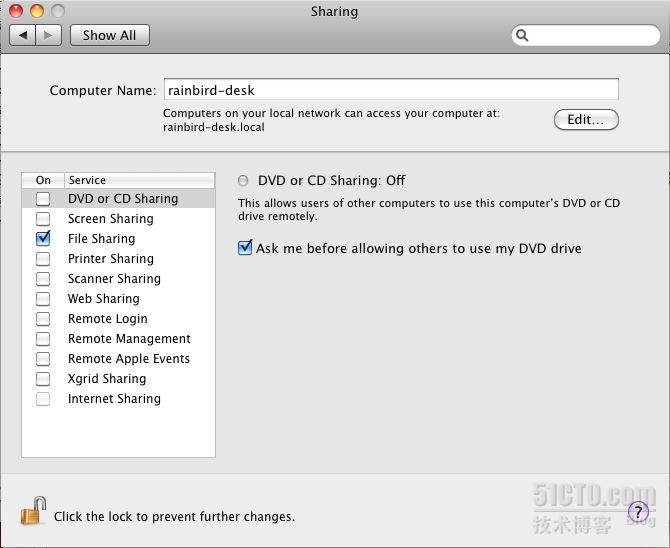 对于大多数用户来说到这里就完事了。但是对于系统管理员来说,每次打开终端的时候发现还有一个"longsky's Macbook Pro"的东东在那里还是感觉很不爽。估计这个想改的人少,笔者费了九牛二虎之力才在mac的一个论坛的不起眼的小角落翻出来修改它的命令:
|
1 |
$ sudo scutil --set HostName longskys-MBP |
最近在 macOS Mojave (10.14.5) 上使用 OpenVPN , 最方便的是使用 Tunnelblick 。但是 Tunnelblick 官方网站https://tunnelblick.net/ 无法正常访问。
替代的方法是通过 brew cask 安装,具体的安装命令如下:
|
1 |
$ brew cask install tunnelblick |
目前 ( 2019/04/24 ),在 macOS Mojave (10.14.4)系统上使用 brew install octave ,安装 Octave 5.1.0 之后,使用 pause() 函数无法在点击键盘之后继续执行,除了 Ctrl + C 之外任意键都不响应。正常情况下,点击任意按键之后,应该继续执行后续的代码。
这个是目前使用 brew 安装的 Octave 5.1.0 在编译的时候,关联的库是 glibc 2.28 之后的版本。这个版本上 glibc 2.28 的某些行为发生变动。具体的讨论信息,参考 bug #55029: pause() with no arguments does not return like kbhit() with glibc 2.28 上的讨论。本质就是 glibc 2.28 之后的版本要求应用程序在接收信息结束( EOF )之后,主动调用 clearerr (stdin); ,否则会收不到后续的按键通知。这个 BUG 在 Octave 5.2 版本被修复,但是这个版本何时发布,暂时不定。
目前的修复方式为要求 brew 从最新版本的代码编译安装,而不是安装已发布版本,如下:
|
1 2 3 4 5 6 7 8 9 10 |
$ brew uninstall --ignore-dependencies octave # 安装编译依赖 $ brew install texinfo $ wget https://raw.githubusercontent.com/Homebrew/homebrew-core/master/Formula/octave.rb $ sed -i "" "s/\"--enable-shared\"/\"--enable-shared\",\"--disable-docs\"/g" octave.rb $ brew install --build-from-source --HEAD -v octave.rb |
修改下载的编译配置文件,并且关闭文档编译( 目前文档编译会失败),也就是增加 --disable-docs 这个编译参数。
调整之后的编译脚本如下:
|
1 2 3 4 5 6 7 8 9 10 11 12 13 14 15 16 17 18 19 20 21 22 23 24 25 26 27 28 29 30 31 32 33 34 35 36 37 38 39 40 41 42 43 44 45 46 47 48 49 50 51 52 53 54 55 56 57 58 59 60 61 62 63 64 65 66 67 68 69 70 71 72 73 74 75 76 77 78 79 80 81 82 83 84 85 86 87 88 89 90 91 92 93 94 95 96 97 98 99 100 101 102 103 104 105 106 107 108 109 110 111 |
class Octave < Formula desc "High-level interpreted language for numerical computing" homepage "https://www.gnu.org/software/octave/index.html" url "https://ftp.gnu.org/gnu/octave/octave-5.1.0.tar.xz" mirror "https://ftpmirror.gnu.org/octave/octave-5.1.0.tar.xz" sha256 "87b4df6dfa28b1f8028f69659f7a1cabd50adfb81e1e02212ff22c863a29454e" revision 2 bottle do sha256 "6bb8497839d6f7872efcd6acad0216f443420e097a9b7fad44835823e1c0e735" => :mojave sha256 "d1de53a30f002d8b7ec3a6065994c46d8cbd4830aa7e199f572baff48723c6e6" => :high_sierra sha256 "7a648cff129ec85a5ee9417a0339a3b804756f7958585b707c015d322d220b15" => :sierra end head do url "https://hg.savannah.gnu.org/hgweb/octave", :branch => "default", :using => :hg depends_on "autoconf" => :build depends_on "automake" => :build depends_on "bison" => :build depends_on "icoutils" => :build depends_on "librsvg" => :build end # Complete list of dependencies at https://wiki.octave.org/Building depends_on "gnu-sed" => :build # https://lists.gnu.org/archive/html/octave-maintainers/2016-09/msg00193.html depends_on :java => ["1.6+", :build] depends_on "pkg-config" => :build depends_on "arpack" depends_on "epstool" depends_on "fftw" depends_on "fig2dev" depends_on "fltk" depends_on "fontconfig" depends_on "freetype" depends_on "gcc" # for gfortran depends_on "ghostscript" depends_on "gl2ps" depends_on "glpk" depends_on "gnuplot" depends_on "graphicsmagick" depends_on "hdf5" depends_on "libsndfile" depends_on "libtool" depends_on "pcre" depends_on "portaudio" depends_on "pstoedit" depends_on "qhull" depends_on "qrupdate" depends_on "qt" depends_on "readline" depends_on "suite-sparse" depends_on "sundials" depends_on "texinfo" depends_on "veclibfort" # Dependencies use Fortran, leading to spurious messages about GCC cxxstdlib_check :skip def install # Default configuration passes all linker flags to mkoctfile, to be # inserted into every oct/mex build. This is unnecessary and can cause # cause linking problems. inreplace "src/mkoctfile.in.cc", /%OCTAVE_CONF_OCT(AVE)?_LINK_(DEPS|OPTS)%/, '""' # Qt 5.12 compatibility # https://savannah.gnu.org/bugs/?55187 ENV["QCOLLECTIONGENERATOR"] = "qhelpgenerator" # These "shouldn't" be necessary, but the build breaks without them. # https://savannah.gnu.org/bugs/?55883 ENV["QT_CPPFLAGS"]="-I#{Formula["qt"].opt_include}" ENV.append "CPPFLAGS", "-I#{Formula["qt"].opt_include}" ENV["QT_LDFLAGS"]="-F#{Formula["qt"].opt_lib}" ENV.append "LDFLAGS", "-F#{Formula["qt"].opt_lib}" system "./bootstrap" if build.head? system "./configure", "--prefix=#{prefix}", "--disable-dependency-tracking", "--disable-silent-rules", "--enable-link-all-dependencies", "--enable-shared","--disable-docs", "--disable-static", "--with-hdf5-includedir=#{Formula["hdf5"].opt_include}", "--with-hdf5-libdir=#{Formula["hdf5"].opt_lib}", "--with-x=no", "--with-blas=-L#{Formula["veclibfort"].opt_lib} -lvecLibFort", "--with-portaudio", "--with-sndfile" system "make", "all" # Avoid revision bumps whenever fftw's or gcc's Cellar paths change inreplace "src/mkoctfile.cc" do |s| s.gsub! Formula["fftw"].prefix.realpath, Formula["fftw"].opt_prefix s.gsub! Formula["gcc"].prefix.realpath, Formula["gcc"].opt_prefix end # Make sure that Octave uses the modern texinfo at run time rcfile = buildpath/"scripts/startup/site-rcfile" rcfile.append_lines "makeinfo_program(\"#{Formula["texinfo"].opt_bin}/makeinfo\");" system "make", "install" end test do system bin/"octave", "--eval", "(22/7 - pi)/pi" # This is supposed to crash octave if there is a problem with veclibfort system bin/"octave", "--eval", "single ([1+i 2+i 3+i]) * single ([ 4+i ; 5+i ; 6+i])" end end |
最近在使用 brew 升级应用的时候,报告如下错误:
|
1 2 3 4 5 6 7 8 9 10 11 12 13 14 15 16 17 18 19 20 21 22 23 24 25 26 27 28 29 30 31 32 |
$ brew upgrade Warning: You are using macOS 10.11. We (and Apple) do not provide support for this old version. You will encounter build failures with some formulae. Please create pull requests instead of asking for help on Homebrew's GitHub, Discourse, Twitter or IRC. You are responsible for resolving any issues you experience, as you are running this old version. ==> Upgrading 7 outdated packages: doxygen 1.8.14 -> 1.8.15, ffmpeg 4.0.2 -> 4.1.3, ilmbase 2.2.1 -> 2.3.0, libpng 1.6.36 -> 1.6.37, lz4 1.8.3 -> 1.9.0, opencv 3.4.2 -> 4.1.0_1, openexr 2.2.0_1 -> 2.3.0 ==> Upgrading libpng ==> Downloading https://downloads.sourceforge.net/libpng/libpng-1.6.37.tar.xz ==> Downloading from https://jaist.dl.sourceforge.net/project/libpng/libpng16/1. ######################################################################## 100.0% ==> ./configure --disable-silent-rules --prefix=/usr/local/Cellar/libpng/1.6.37 ==> make ==> make test ==> make install ? /usr/local/Cellar/libpng/1.6.37: 27 files, 1.2MB, built in 3 minutes 59 seconds Removing: /usr/local/Cellar/libpng/1.6.36... (28 files, 1.2MB) Removing: /Users/xxxx/Library/Caches/Homebrew/libpng--1.6.36.tar.xz... (0B) ==> Upgrading ffmpeg ==> Installing dependencies for ffmpeg: aom, frei0r, libtasn1, nettle, libffi, p11-kit, libevent, unbound, gnutls, fribidi, ninja, meson, glib, pixman, cairo, gobject-introspection, graphite2, harfbuzz, libass, libbluray, libsoxr, opencore-amr, doxygen, little-cms2, openjpeg, rtmpdump, flac, libsndfile, libsamplerate, rubberband, speex, autoconf-archive, giflib, webp, leptonica, tesseract and x265 ==> Installing ffmpeg dependency: aom ==> Cloning https://aomedia.googlesource.com/aom.git Cloning into '/Users/xxxx/Library/Caches/Homebrew/aom--git'... fatal: unable to access 'https://aomedia.googlesource.com/aom.git/': Failed to connect to aomedia.googlesource.com port 443: Operation timed out Error: An exception occurred within a child process: DownloadError: Failed to download resource "aom" Failure while executing; `git clone --branch v1.0.0 https://aomedia.googlesource.com/aom.git /Users/xxxx/Library/Caches/Homebrew/aom--git` exited with 128. Here's the output: Cloning into '/Users/xxxx/Library/Caches/Homebrew/aom--git'... fatal: unable to access 'https://aomedia.googlesource.com/aom.git/': Failed to connect to aomedia.googlesource.com port 443: Operation timed out |
众所周知的原因,很早之前,就已经不能访问 Google 的服务器了,因此这个错误是正常现象。
解决方法如下:
|
1 2 3 4 5 6 7 8 |
$ wget https://raw.githubusercontent.com/Homebrew/homebrew-core/master/Formula/aom.rb # 用本站提供的一份代码拷贝来替代原来的地址 $ sed -i "" "s/https:\/\/aomedia\.googlesource\.com\/aom\.git/https:\/\/www.mobibrw.com\/wp-content\/uploads\/2019\/04\/aom.zip/g" aom.rb $ brew uninstall --ignore-dependencies aom $ brew install --build-from-source aom.rb --env=std |