前置条件
- ubuntu 24.04.2 LTS
- Visual Studio Code 1.98.2
- Flutter 3.29.1
问题描述
在使用 Visual Studio Code 调试 Flutter 代码的时候,如果在依赖库的代码中设置断点,会无法断点,并且提示断点未验证,"Unverified Breakpoint"。
如下图:
继续阅读在Visual Studio Code中调试Flutter Dart代码报错未验证断点(Unverified Breakpoint)
- ubuntu 24.04.2 LTS
- Visual Studio Code 1.98.2
- Flutter 3.29.1
在使用 Visual Studio Code 调试 Flutter 代码的时候,如果在依赖库的代码中设置断点,会无法断点,并且提示断点未验证,"Unverified Breakpoint"。
如下图:
继续阅读在Visual Studio Code中调试Flutter Dart代码报错未验证断点(Unverified Breakpoint)
最近网站被恶意搜索攻击,收到腾讯云的内容违规通知,内容如下:
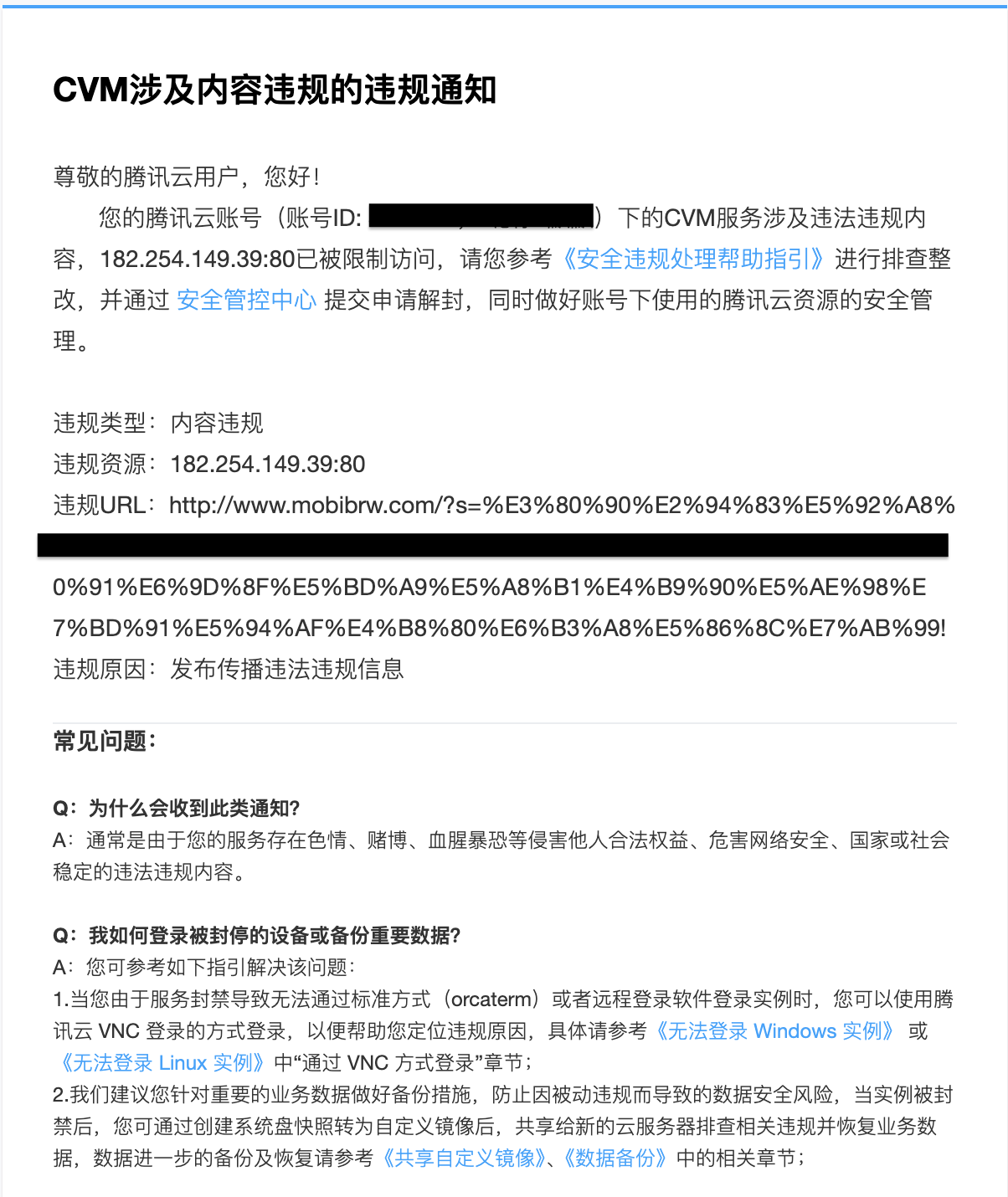
这种恶意搜索攻击,其实非常简单,就是通过既定的网址结构不断对网站发起不良关键词搜索访问,比如 WordPress 的搜索网址结构为 域名/?s=搜索词,而且可能还会顺便将访问的地址推送到各大搜索引擎,加快这些恶意网址的收录。这样,你的网站就会沦为这些不法之徒传播不良信息的渠道,这对网站排名是非常不利的,甚至可能会直接被搜索引擎拉入黑名单。
解决方案如下:
1、禁止搜索引擎收录搜索结果页
搜索结果页一般我们都不推荐被收录,所以建议大家还是禁止收录。现在几乎所有搜索引擎都遵循 robots.txt 的规则,也就是我们可以通过 robots.txt 定义规则,阻止搜索引擎收录搜索结果页面。我们可以在网站根目录,创建一个 robots.txt 文件,填入下面的内容:
|
1 |
Disallow: /?s=* |
这样就禁止搜索引擎收录 WordPress 搜索结果页面。
2、在搜索结果为零时,跳转到首页
网上的做法都是直接禁用 WordPress 自带的搜索功能,只是其实这个自带的搜索功能还是蛮好用的,而且目前也没有对服务器造成很大的压力。我这边的想法是保留搜索功能,只是当搜索结果不存在的时候,自动跳转到首页。
目前测试到可行的办法是直接在主题的 functions.php 中增加如下代码:
|
1 2 3 4 5 6 7 8 9 10 11 12 13 |
<?php // 搜索文章内容,搜索结果为零时,跳转到首页 // 解决腾讯云通报内容违规问题 http://www.mobibrw.com/?s=违规词 add_action( 'template_redirect', 'redirect_empty_search_results' ); function redirect_empty_search_results() { global $wp_query; if ( is_search() && $wp_query->found_posts == 0 ) { wp_redirect( home_url() ); exit(); } } ?> |
曾经试过在主题的 content-none.php 中通过 wp_redirect 进行跳转,虽然可见内容不存在了,但是页面源代码中会出现搜索词标签,因此不可行。
测试代码:
|
1 |
$ curl "http://www.mobibrw.com/?s=违规词" | grep "违规词" |
也曾经测试过自定义 searchform.php ,也是存在上述问题。
自定义 404.php 是无效的。搜索关键词过滤又实在是太多了,还不如搜索不到结果就返回首页更简单。
在克隆仓库或者拉取代码的时候出现类似如下错误:
|
1 2 3 4 5 6 7 8 9 |
$ git clone https://github.com/WebPlatformForEmbedded/WPEWebKit.git Cloning into 'WPEWebKit'… remote: Enumerating objects: 5893112, done. remote: Counting objects: 100% (2540/2540), done. remote: Compressing objects: 100% (1256/1256), done. client_loop: send disconnect: Broken pipeB | 770.00 KiB/s fetch-pack: unexpected disconnect while reading sideband packet fatal: early EOF fatal: fetch-pack: invalid index-pack output |
|
1 2 3 4 5 6 7 8 9 10 |
$ git clone https://github.com/WebPlatformForEmbedded/WPEWebKit.git 正克隆到 'WPEWebKit'... remote: Enumerating objects: 5893112, done. remote: Counting objects: 100% (2540/2540), done. remote: Compressing objects: 100% (1256/1256), done. 错误:RPC 失败。curl 56 Recv failure: Operation timed out 错误:预期仍然需要 1329 个字节的正文 fetch-pack: unexpected disconnect while reading sideband packet 致命错误:过早的文件结束符(EOF) 致命错误:fetch-pack:无效的 index-pack 输出 |
主要是由于 仓库 内容比较大,或者仓库中有比较大的文件,由于 http 协议 或者 传输数据大小限制导致的,可以通过设置如下参数解决:
|
1 2 3 4 5 6 7 8 9 |
$ git config --global http.postBuffer 524288000 $ git config --global http.version HTTP/1.1 # 如果网络环境不太好,可以通过增加下面的参数,降低失败率 $ git config --global http.lowSpeedLimit 0 $ git config --global http.lowSpeedTime 999999 |
解决fetch-pack: unexpected disconnect while reading sideband packet fatal: early EOF fatal: fetch-pack
- ubuntu 24.04.2 LTS
|
1 2 3 4 5 6 7 8 9 10 11 12 13 14 15 16 17 18 19 20 21 22 23 24 25 26 27 28 29 30 31 32 33 34 35 36 37 38 39 40 41 42 43 44 45 46 47 48 49 50 51 52 53 54 55 56 57 58 59 60 61 62 63 64 65 66 67 68 69 70 71 72 73 74 75 76 77 78 79 80 81 82 83 84 85 86 87 88 89 90 91 92 93 94 95 96 97 98 99 100 101 102 103 104 105 106 107 108 109 110 111 112 113 114 115 116 |
# Could NOT find Ruby (missing: Ruby_EXECUTABLE Ruby_INCLUDE_DIR Ruby_LIBRARY) (Required is at least version "2.5") $ sudo apt install ruby # Could NOT find GLIB (missing: GLIB_INCLUDE_DIRS GLIB_LIBRARIES $ sudo apt install libglib2.0-dev # Could NOT find Cairo (missing: Cairo_LIBRARY Cairo_INCLUDE_DIR) (Required is at least version "1.16.0") $ sudo apt install libcaribou-dev # Could NOT find LibGcrypt (missing: LibGcrypt_LIBRARY LibGcrypt_INCLUDE_DIR $ sudo apt install libgcrypt-dev # Could NOT find Libtasn1 (missing: LIBTASN1_LIBRARIES) $ sudo apt install libtasn1-dev # Could NOT find SQLite3 (missing: SQLite3_INCLUDE_DIR SQLite3_LIBRARY) $ sudo apt install libsqlite3-dev # Could NOT find GTK (missing: GTK_VERSION) (Required is at least version $ sudo apt install libgtk-4-dev # Could NOT find LibSoup: (Required is at least version "3.0.0") (found LIBSOUP_INCLUDE_DIRS-NOTFOUND) $ sudo apt install libsoup-3.0-dev # Could NOT find Manette (missing: Manette_INCLUDE_DIR Manette_LIBRARY) (Required is at least version "0.2.4") $ sudo apt install libmanette-0.2-dev # Could NOT find LibXslt (missing: LIBXSLT_LIBRARIES LIBXSLT_INCLUDE_DIR) $ sudo apt install libxslt1-dev # Could NOT find Libsecret (missing: LIBSECRET_INCLUDE_DIRS LIBSECRET_LIBRARIES) $ sudo apt install libsecret-1-dev # Could NOT find GI (missing: GI_SCANNER_EXE GI_COMPILER_EXE) $ sudo apt install gobject-introspection # Could NOT find GIDocgen (missing: GIDocgen_EXE GIDocgen_VERSION) $ sudo apt install gi-docgen # Could NOT find LibDRM (missing: LibDRM_INCLUDE_DIR LibDRM_LIBRARY) $ sudo apt install libdrm-dev # Could NOT find GBM (missing: GBM_LIBRARY GBM_INCLUDE_DIR) $ sudo apt install libgbm-dev # Could NOT find Flite (missing: Flite_INCLUDE_DIR Flite_LIBRARY) (Required is at least version "2.2") $ sudo apt install flite1-dev # Package 'enchant-2', required by 'virtual:world', not found $ sudo apt install libenchant-2-dev # Could NOT find JPEGXL (missing: JPEGXL_LIBRARY JPEGXL_INCLUDE_DIR) (Required is at least version "0.7.0") $ sudo apt install libjxl-dev # Could NOT find Hyphen (missing: HYPHEN_INCLUDE_DIR HYPHEN_LIBRARIES) $ sudo apt install libhyphen-dev # Could NOT find WOFF2 (missing: WOFF2_LIBRARY _WOFF2_REQUIRED_LIBS_FOUND) (Required is at least version "1.0.2") $ sudo apt install libwoff-dev # Could NOT find AVIF (missing: AVIF_INCLUDE_DIR AVIF_LIBRARY) (Required is at least version "0.9.0") $ sudo apt install libavif-dev # Could NOT find Journald (missing: Journald_LIBRARY Journald_INCLUDE_DIR) $ sudo apt install libsystemd-dev # Could NOT find LibBacktrace (missing: LIBBACKTRACE_INCLUDE_DIR LIBBACKTRACE_LIBRARY) # -DUSE_LIBBACKTRACE=OFF # Could NOT find Libseccomp (missing: Libseccomp_LIBRARY Libseccomp_INCLUDE_DIR) $ sudo apt install libseccomp-dev # WebAudio requires the audio and fft GStreamer libraries. Please check your gst-plugins-base installation. $ sudo apt install libgstreamer1.0-dev libgstreamer-plugins-base1.0-dev # GStreamerTranscoder >= 1.20 is needed for USE_GSTREAMER_TRANSCODER. $ sudo apt install libgstreamer1.0-dev libgstreamer-plugins-base1.0-dev libgstreamer-plugins-bad1.0-dev gstreamer1.0-plugins-base gstreamer1.0-plugins-good gstreamer1.0-plugins-bad gstreamer1.0-plugins-ugly gstreamer1.0-libav gstreamer1.0-tools gstreamer1.0-x gstreamer1.0-alsa gstreamer1.0-gl gstreamer1.0-gtk3 gstreamer1.0-qt5 gstreamer1.0-pulseaudio # Could NOT find Gperf (missing: GPERF_EXECUTABLE) (Required is at least version "3.0.1") $ sudo apt install gperf # Could NOT find Unifdef (missing: UNIFDEF_EXECUTABLE) $ sudo apt install unifdef # Could NOT find Gettext (missing: GETTEXT_MSGMERGE_EXECUTABLE GETTEXT_MSGFMT_EXECUTABLE) $ sudo apt install gettext $ sudo apt install git $ sudo apt install bzip2 make perl cmake ninja-build clang # git clone https://gitee.com/mirrors/WebKit.git webkit $ git clone https://github.com/webkit/webkit.git $ cd webkit $ git checkout -b webkitgtk-2.48.0 $ mkdir build $ cd build # c++: error: unrecognized command-line option ‘-fcolor-diagnostics’ # c++: error: unrecognized command-line option ‘-Qunused-arguments’ # 指定 clang 编译 -DCMAKE_CXX_COMPILER=/usr/bin/clang++ -DCMAKE_C_COMPILER=/usr/bin/clang # 包含调试符号 -DCMAKE_BUILD_TYPE=RelWithDebInfo $ cmake ../ -DPORT=GTK -DUSE_LIBBACKTRACE=OFF -DENABLE_GAMEPAD=OFF -DENABLE_BUBBLEWRAP_SANDBOX=OFF -DCMAKE_BUILD_TYPE=Release -DCMAKE_CXX_COMPILER=/usr/bin/clang++ -DCMAKE_C_COMPILER=/usr/bin/clang -GNinja .. # cmake ../ -DPORT=GTK -DUSE_LIBBACKTRACE=OFF -DENABLE_GAMEPAD=OFF -DENABLE_BUBBLEWRAP_SANDBOX=OFF -DCMAKE_BUILD_TYPE=Release -DCMAKE_CXX_COMPILER=/usr/bin/clang++ -DCMAKE_C_COMPILER=/usr/bin/clang -DENABLE_DOCUMENTATION=OFF -DENABLE_WEB_AUDIO=OFF -DUSE_AVIF=OFF -DUSE_GSTREAMER_TRANSCODER=OFF -DENABLE_WEBDRIVER=OFF -DUSE_WOFF2=OFF -GNinja .. $ ninja # 执行安装 $ sudo ninja install |
如果先执行
|
1 |
$ cmake ../ -DPORT=GTK -DUSE_LIBBACKTRACE=OFF -DENABLE_GAMEPAD=OFF -DENABLE_BUBBLEWRAP_SANDBOX=OFF -DCMAKE_BUILD_TYPE=Release -DCMAKE_CXX_COMPILER=/usr/bin/clang++ -DCMAKE_C_COMPILER=/usr/bin/clang -DENABLE_DOCUMENTATION=OFF -DENABLE_WEB_AUDIO=OFF -DUSE_AVIF=OFF -DUSE_GSTREAMER_TRANSCODER=OFF -DENABLE_WEBDRIVER=OFF -DUSE_WOFF2=OFF -GNinja .. |
在不关闭当前窗口的情况下,尝试构建 WPE
|
1 2 3 |
$ ./Tools/wpe/install-dependencies $ cmake ../ -DPORT=WPE -DUSE_LIBBACKTRACE=OFF -DENABLE_GAMEPAD=OFF -DENABLE_BUBBLEWRAP_SANDBOX=OFF -DCMAKE_BUILD_TYPE=Release -DCMAKE_CXX_COMPILER=/usr/bin/clang++ -DCMAKE_C_COMPILER=/usr/bin/clang -DENABLE_DOCUMENTATION=OFF -DENABLE_WEB_AUDIO=OFF -DUSE_AVIF=OFF -DUSE_GSTREAMER_TRANSCODER=OFF -DENABLE_WEBDRIVER=OFF -DUSE_WOFF2=OFF -GNinja .. |
则基本上会出现如下报错信息:
|
1 2 3 4 5 6 7 8 9 10 11 12 |
CMake Error at /usr/share/cmake-3.28/Modules/FindPackageHandleStandardArgs.cmake:230 (message): Could NOT find WPEBackendFDO (missing: WPEBackendFDO_LIBRARY WPEBackendFDO_INCLUDE_DIR) (Required is at least version "1.3.0") Call Stack (most recent call first): /usr/share/cmake-3.28/Modules/FindPackageHandleStandardArgs.cmake:600 (_FPHSA_FAILURE_MESSAGE) Source/cmake/FindWPEBackendFDO.cmake:98 (find_package_handle_standard_args) Tools/wpe/backends/PlatformWPE.cmake:4 (find_package) Source/cmake/WebKitMacros.cmake:81 (include) Tools/wpe/backends/CMakeLists.txt:39 (WEBKIT_INCLUDE_CONFIG_FILES_IF_EXISTS) -- Configuring incomplete, errors occurred! |
原因是上一次执行设置了相关环境变量,后一次执行构建命令部分变量覆盖失败。
解决方法很简单,重新打开一个全新的构建窗口,然后重新执行上述命令即可解决此问题。
fastforge (原名 flutter_distributor)是一个强大的工具,支持跨平台发布和高级打包选项。
确保 fastforge 已安装:
|
1 |
$ dart pub global activate fastforge |
为高级打包配置所需的文件:
macOS:
如果打包 DMG 安装包:macos/packaging/dmg/make_config.yaml
|
1 2 3 4 5 6 7 8 9 10 |
title: 应用名称 contents: - x: 448 y: 244 type: link path: "/Applications" - x: 192 y: 244 type: file path: 应用名称.app |
如果打包 PKG 安装包:macos/packaging/pkg/make_config.yaml
|
1 2 |
install-path: /Applications #sign-identity: <your-sign-identity> |
distribute_options.yaml
|
1 |
output: dist/ |
Windows:
如果打包 exe 安装包:windows/packaging/exe/inno_setup.sas
|
1 2 3 4 5 6 7 8 9 10 11 12 13 14 15 16 17 18 19 20 21 22 23 24 25 26 27 28 29 30 31 32 33 34 35 36 37 38 39 40 41 42 43 44 45 46 47 48 49 50 51 52 53 54 55 56 57 58 59 60 61 62 63 64 65 66 67 68 69 70 71 72 73 |
[Setup] AppId={{APP_ID}} AppVersion={{APP_VERSION}} AppName={{DISPLAY_NAME}} AppPublisher={{PUBLISHER_NAME}} AppPublisherURL={{PUBLISHER_URL}} AppSupportURL={{PUBLISHER_URL}} AppUpdatesURL={{PUBLISHER_URL}} DefaultDirName={{INSTALL_DIR_NAME}} DisableProgramGroupPage=yes OutputDir=. OutputBaseFilename={{OUTPUT_BASE_FILENAME}} Compression=lzma SolidCompression=yes SetupIconFile={{SETUP_ICON_FILE}} WizardStyle=modern PrivilegesRequired={{PRIVILEGES_REQUIRED}} ArchitecturesAllowed=x64 ArchitecturesInstallIn64BitMode=x64 CloseApplications=force [Languages] {% for locale in LOCALES %} {% if locale == 'en' %}Name: "english"; MessagesFile: "compiler:Default.isl"{% endif %} {% if locale == 'hy' %}Name: "armenian"; MessagesFile: "compiler:Languages\\Armenian.isl"{% endif %} {% if locale == 'bg' %}Name: "bulgarian"; MessagesFile: "compiler:Languages\\Bulgarian.isl"{% endif %} {% if locale == 'ca' %}Name: "catalan"; MessagesFile: "compiler:Languages\\Catalan.isl"{% endif %} {% if locale == 'zh' %}Name: "chinesesimplified"; MessagesFile: "compiler:Languages\\ChineseSimplified.isl"{% endif %} {% if locale == 'co' %}Name: "corsican"; MessagesFile: "compiler:Languages\\Corsican.isl"{% endif %} {% if locale == 'cs' %}Name: "czech"; MessagesFile: "compiler:Languages\\Czech.isl"{% endif %} {% if locale == 'da' %}Name: "danish"; MessagesFile: "compiler:Languages\\Danish.isl"{% endif %} {% if locale == 'nl' %}Name: "dutch"; MessagesFile: "compiler:Languages\\Dutch.isl"{% endif %} {% if locale == 'fi' %}Name: "finnish"; MessagesFile: "compiler:Languages\\Finnish.isl"{% endif %} {% if locale == 'fr' %}Name: "french"; MessagesFile: "compiler:Languages\\French.isl"{% endif %} {% if locale == 'de' %}Name: "german"; MessagesFile: "compiler:Languages\\German.isl"{% endif %} {% if locale == 'he' %}Name: "hebrew"; MessagesFile: "compiler:Languages\\Hebrew.isl"{% endif %} {% if locale == 'is' %}Name: "icelandic"; MessagesFile: "compiler:Languages\\Icelandic.isl"{% endif %} {% if locale == 'it' %}Name: "italian"; MessagesFile: "compiler:Languages\\Italian.isl"{% endif %} {% if locale == 'ja' %}Name: "japanese"; MessagesFile: "compiler:Languages\\Japanese.isl"{% endif %} {% if locale == 'no' %}Name: "norwegian"; MessagesFile: "compiler:Languages\\Norwegian.isl"{% endif %} {% if locale == 'pl' %}Name: "polish"; MessagesFile: "compiler:Languages\\Polish.isl"{% endif %} {% if locale == 'pt' %}Name: "portuguese"; MessagesFile: "compiler:Languages\\Portuguese.isl"{% endif %} {% if locale == 'ru' %}Name: "russian"; MessagesFile: "compiler:Languages\\Russian.isl"{% endif %} {% if locale == 'sk' %}Name: "slovak"; MessagesFile: "compiler:Languages\\Slovak.isl"{% endif %} {% if locale == 'sl' %}Name: "slovenian"; MessagesFile: "compiler:Languages\\Slovenian.isl"{% endif %} {% if locale == 'es' %}Name: "spanish"; MessagesFile: "compiler:Languages\\Spanish.isl"{% endif %} {% if locale == 'tr' %}Name: "turkish"; MessagesFile: "compiler:Languages\\Turkish.isl"{% endif %} {% if locale == 'uk' %}Name: "ukrainian"; MessagesFile: "compiler:Languages\\Ukrainian.isl"{% endif %} {% endfor %} [Tasks] Name: "desktopicon"; Description: "{cm:CreateDesktopIcon}"; GroupDescription: "{cm:AdditionalIcons}"; Flags: {% if CREATE_DESKTOP_ICON != true %}unchecked{% else %}checkedonce{% endif %} Name: "launchAtStartup"; Description: "{cm:AutoStartProgram,{{DISPLAY_NAME}}}"; GroupDescription: "{cm:AdditionalIcons}"; Flags: {% if LAUNCH_AT_STARTUP != true %}unchecked{% else %}checkedonce{% endif %} [Files] Source: "{{SOURCE_DIR}}\\*"; DestDir: "{app}"; Flags: ignoreversion recursesubdirs createallsubdirs ; NOTE: Don't use "Flags: ignoreversion" on any shared system files [Icons] Name: "{autoprograms}\\{{DISPLAY_NAME}}"; Filename: "{app}\\{{EXECUTABLE_NAME}}" Name: "{autodesktop}\\{{DISPLAY_NAME}}"; Filename: "{app}\\{{EXECUTABLE_NAME}}"; Tasks: desktopicon Name: "{userstartup}\\{{DISPLAY_NAME}}"; Filename: "{app}\\{{EXECUTABLE_NAME}}"; WorkingDir: "{app}"; Tasks: launchAtStartup [Run] Filename: "{app}\\{{EXECUTABLE_NAME}}"; Description: "{cm:LaunchProgram,{{DISPLAY_NAME}}}"; Flags: {% if PRIVILEGES_REQUIRED == 'admin' %}runascurrentuser{% endif %} nowait postinstall skipifsilent [Code] function InitializeSetup(): Boolean; var ResultCode: Integer; begin Exec('taskkill', '/F /IM 应用名称.exe', '', SW_HIDE, ewWaitUntilTerminated, ResultCode) Result := True; end; |
windows/packaging/exe/make_config.yaml
|
1 2 3 4 5 6 7 8 9 10 11 12 13 14 15 16 17 |
app_id: 6L913538-42B1-4596-G479-BJ779F21A65D publisher: 应用名称 publisher_url: https://github.com/aaa/aaa display_name: 应用名称 executable_name: 应用名称.exe output_base_file_name: 应用名称.exe create_desktop_icon: true install_dir_name: "{autopf64}\\应用名称" setup_icon_file: ..\..\windows\runner\resources\app_icon.ico locales: - ar - en - fa - ru - pt - tr script_template: inno_setup.sas |
如果打包 msix windows/packaging/msix/make_config.yaml
|
1 2 3 4 5 6 7 8 9 10 11 12 13 14 15 16 17 18 19 20 21 22 23 24 25 26 27 28 29 30 31 32 33 34 35 36 37 38 39 40 41 42 43 |
# 应用名称 display_name: 应用名称 # 应用名称 publisher_display_name: 应用名称 # 应用名称 identity_name: 应用名称.appioi msix_version: 2.5.7.0 # 应用图标 logo_path: windows\runner\resources\app_icon.ico # 应用能力 capabilities: internetClient, internetClientServer, privateNetworkClientServer # 多语言 languages: en-us, zh-cn, zh-tw, tr-tr,fa-ir,ru-ru,pt-br,es-es protocol_activation: 应用名称 execution_alias: 应用名称 # 签名证书 # certificate_path: windows\sign.pfx # 签名证书密码 certificate_password: # 发布者的唯一识别ID publisher: CN=8CB43675-F44B-4AA5-9372-E8727781BDC4 install_certificate: "false" # let OS know if the application can be run on start_up. If it's false # the application will deny to the OS if it was added as a start_up # application enable_at_startup: "false" # 应用启动参数 startup_task: parameters: --autostart |
Linux:
linux/packaging/appimage
有两个文件 linux/packaging/appimage/AppRun
|
1 2 3 4 5 6 7 8 9 10 11 12 13 14 15 16 17 18 19 20 21 22 23 24 25 26 27 28 29 30 31 32 33 34 35 36 37 38 39 40 41 42 43 44 45 46 47 48 49 |
#!/bin/bash cd "$(dirname "$0")" export LD_LIBRARY_PATH=usr/lib # Usage info show_help() { cat << EOF Usage: ${0##*/} ... start app or app, when no parameter is given, app is executed. -v show version EOF } show_version() { printf "app version " jq .version <./data/flutter_assets/version.json } # Initialize variables: service=0 #declare -i service OPTIND=1 # Resetting OPTIND is necessary if getopts was used previously in the script. # It is a good idea to make OPTIND local if you process options in a function. # if no arg is provided, execute app if [[ $# == 0 ]];then exec ./app else # processing arguments case $1 in appCli) exec ./appCli ${@:3} exit 0 ;; h) show_help exit 0 ;; v) show_version exit 0 ;; *) show_help >&2 exit 1 ;; esac fi |
linux/packaging/appimage/make_config.yaml
|
1 2 3 4 5 6 7 8 9 10 11 12 13 14 15 16 17 18 19 20 21 22 23 24 25 26 27 28 29 30 31 32 33 34 35 36 |
display_name: App名称 icon: ./assets/images/source/ic_launcher_border.png keywords: - Hi generic_name: App名称 actions: - name: Start label: start arguments: - --start - name: Stop label: stop arguments: - --stop categories: - Network startup_notify: true app_run_file: AppRun # You can specify the shared libraries that you want to bundle with your app # # flutter_distributor automatically detects the shared libraries that your app # depends on, but you can also specify them manually here. # # The following example shows how to bundle the libcurl library with your app. # # include: # - libcurl.so.4 include: [] |
linux/packaging/deb 文件 linux/packaging/deb/make_config.yaml
|
1 2 3 4 5 6 7 8 9 10 11 12 13 14 15 16 17 18 19 20 21 22 23 24 25 26 27 28 29 30 31 32 33 34 35 36 37 38 39 40 41 42 43 44 45 46 47 48 49 50 51 52 53 54 55 56 57 58 59 60 61 62 63 64 65 66 67 68 69 70 71 72 73 74 75 76 77 78 79 80 81 82 83 84 85 86 87 88 89 90 91 92 93 94 95 96 97 98 99 100 101 102 103 104 105 106 107 108 109 110 111 112 113 |
# the name used to display in the OS. Specifically desktop # entry name display_name: AppName # package name for debian/apt repository # the name should be all lowercase with -+. package_name: AppName # 所有者 maintainer: name: xxx email: xxx@xxx.com # 联合作者 # co_authors: # - name: xxxx # email: xxxx@xxxx.com # enum options -> required, important, standard, optional, extra # refer: https://www.debian.org/doc/debian-policy/ch-archive.html#s-priorities priority: optional # enum options: admin, cli-mono, comm, database, debug, devel, doc, editors, education, electronics, embedded, fonts, games, gnome, gnu-r, gnustep, graphics, hamradio, haskell, httpd, interpreters, introspection, java, javascript, kde, kernel, libdevel, libs, lisp, localization, mail, math, metapackages, misc, net, news, ocaml, oldlibs, otherosfs, perl, php, python, ruby, rust, science, shells, sound, tasks, tex, text, utils, vcs, video, web, x11, xfce, zope # refer: https://www.debian.org/doc/debian-policy/ch-archive.html#s-subsections section: x11 # the size of binary in kilobyte installed_size: 6604 # direct dependencies required by the application # refer: https://www.debian.org/doc/debian-policy/ch-relationships.html dependencies: - libqt5widgets5 (>= 5.15) - libwebkit2gtk (>= 4.0), libsoup (>= 2.4), gettext (>= 0.21) # refer: https://www.debian.org/doc/debian-policy/ch-relationships.html # build_dependencies_indep: # - texinfo # refer: https://www.debian.org/doc/debian-policy/ch-relationships.html # build_dependencies: # - kernel-headers-2.2.10 [!hurd-i386] # - gnumach-dev [hurd-i386] # - libluajit5.1-dev [i386 amd64 kfreebsd-i386 armel armhf powerpc mips] # refer: https://www.debian.org/doc/debian-policy/ch-relationships.html # recommended_dependencies: # - neofetch # refer: https://www.debian.org/doc/debian-policy/ch-relationships.html # suggested_dependencies: # - libkeybinder-3.0-0 (>= 0.3.2) # refer: https://www.debian.org/doc/debian-policy/ch-relationships.html # enhances: # - spotube # refer: https://www.debian.org/doc/debian-policy/ch-relationships.html # pre_dependencies: # - libc6 # refer: https://www.debian.org/doc/debian-policy/ch-relationships.html#packages-which-break-other-packages-breaks # breaks: # - libspotify (<< 3.0.0) # refer: https://www.debian.org/doc/debian-policy/ch-relationships.html#conflicting-binary-packages-conflicts # conflicts: # - spotify # refer: https://www.debian.org/doc/debian-policy/ch-relationships.html#virtual-packages-provides # provides: # - libx11 # refer: https://www.debian.org/doc/debian-policy/ch-relationships.html#overwriting-files-and-replacing-packages-replaces # replaces: # - spotify essential: false postinstall_scripts: - echo "Installed AppName" postuninstall_scripts: - echo "Surprised Why?" # application icon path relative to project url # icon: assets/logo.png keywords: - AppName # a name to categorize the app into a section of application generic_name: EisApp # supported mime types that can be opened using this application # supported_mime_type: # - audio/mpeg # shown when right clicked the desktop entry icons # actions: # - Gallery # - Create # the categories the application belong to # refer: https://specifications.freedesktop.org/menu-spec/latest/ categories: - Network # let OS know if the application can be run on start_up. If it's false # the application will deny to the OS if it was added as a start_up # application startup_notify: false |
linux/packaging/rpm 文件 linux/packaging/rpm/make_config.yaml
|
1 2 3 4 5 6 7 8 9 10 11 12 13 14 15 16 17 18 19 20 21 |
display_name: App url: https://github.com/app/app-next/ license: Other packager: App packagerEmail: linux@App.com priority: optional section: x11 installed_size: 6604 essential: false icon: ./assets/images/source/ic_launcher_border.png keywords: - Hi generic_name: App group: Applications/Internet startup_notify: true |
打包 macOS (DMG 和 PKG)
|
1 2 3 |
$ export PATH="$PATH":"$HOME/.pub-cache/bin" $ fastforge package --flutter-build-args=verbose --platform macos --targets dmg,pkg |
打包 Windows (EXE 和 MSIX)
|
1 2 3 4 5 |
$Env:PATH += ";$HOME/AppData/Local/Pub/Cache/bin" dart pub global activate fastforge fastforge package --flutter-build-args=verbose --platform windows --targets exe,msix |
打包 Linux (DEB、RPM 和 AppImage)
|
1 2 3 |
$ export PATH="$PATH":"$HOME/.pub-cache/bin" $ fastforge package --flutter-build-args=verbose --platform linux --targets deb,rpm,appimage |
参考 Python3-使用U盾完成数据的加解密(国密算法SKF接口),那么相同的功能如何使用 Flutter FFI 实现呢?
- Flutter 3.29.1
- ffi 2.1.4
- pointycastle 3.6.0
- pkcs7 1.0.5
- convert 3.1.2
代码参考如下:
|
1 2 3 4 5 6 7 8 9 10 11 12 13 14 15 16 17 18 19 20 21 22 23 24 25 26 27 28 29 30 31 32 33 34 35 36 37 38 39 40 41 42 43 44 45 46 47 48 49 50 51 52 53 54 55 56 57 58 59 60 61 62 63 64 65 66 67 68 69 70 71 72 73 74 75 76 77 78 79 80 81 82 83 84 85 86 87 88 89 90 91 92 93 94 95 96 97 98 99 100 101 102 103 104 105 106 107 108 109 110 111 112 113 114 115 116 117 118 119 120 121 122 123 124 125 126 127 128 129 130 131 132 133 134 135 136 137 138 139 140 141 142 143 144 145 146 147 148 149 150 151 152 153 154 155 156 157 158 159 160 161 162 163 164 165 166 167 168 169 170 171 172 173 174 175 176 177 178 179 180 181 182 183 184 185 186 187 188 189 190 191 192 193 194 195 196 197 198 199 200 201 202 203 204 205 206 207 208 209 210 211 212 213 214 215 216 217 218 219 220 221 222 223 224 225 226 227 228 229 230 231 232 233 234 235 236 237 238 239 240 241 242 243 244 245 246 247 248 249 250 251 252 253 254 255 256 257 258 259 260 261 262 263 264 265 266 267 268 269 270 271 272 273 274 275 276 277 278 279 280 281 282 283 284 285 286 287 288 289 290 291 292 293 294 295 296 297 298 299 300 301 302 303 304 305 306 307 308 309 310 311 312 313 314 315 316 317 318 319 320 321 322 323 324 325 326 327 328 329 330 331 332 333 334 335 336 337 338 339 340 341 342 343 344 345 346 347 348 349 350 351 352 353 354 355 356 357 358 359 360 361 362 363 364 365 366 367 368 369 370 371 372 373 374 375 376 377 378 379 380 381 382 383 384 385 386 387 388 389 390 391 392 393 394 395 396 397 398 399 400 401 402 403 404 405 406 407 408 409 410 411 412 413 414 415 416 417 418 419 420 421 422 423 424 425 426 427 428 429 430 431 432 433 434 435 436 437 438 439 440 441 442 443 444 445 446 447 448 449 450 451 452 453 454 455 456 457 458 459 460 461 462 463 464 465 466 467 468 469 470 471 472 473 474 475 476 477 478 479 480 481 482 483 484 485 486 487 488 489 490 491 492 493 494 495 496 497 498 499 500 501 502 503 504 505 506 507 508 509 510 511 512 513 514 515 516 517 518 519 520 521 522 523 524 525 526 527 528 529 530 531 532 533 534 535 536 537 538 539 540 541 542 543 544 545 546 547 548 549 550 551 552 553 554 555 556 557 558 559 560 561 562 563 564 565 566 567 568 569 570 571 572 573 574 575 576 577 578 579 580 581 582 583 584 585 586 587 588 589 590 591 592 593 594 595 596 597 598 599 600 601 602 603 604 605 606 607 608 609 610 611 612 613 614 615 616 617 618 619 620 621 622 623 624 625 626 627 628 629 630 631 632 633 634 635 636 637 638 639 640 641 642 643 644 645 646 647 648 649 650 651 652 653 654 655 656 657 658 659 660 661 662 663 664 665 666 667 668 669 670 671 672 673 674 675 676 677 678 679 680 681 682 683 684 685 686 687 688 689 690 691 692 693 694 695 696 697 698 699 700 701 702 703 704 705 706 707 708 709 710 711 712 713 714 715 716 717 718 719 720 721 722 723 724 725 726 727 728 729 730 731 732 733 734 735 736 737 738 739 740 741 742 743 744 745 746 747 748 749 750 751 752 753 754 755 756 757 758 759 760 761 762 763 764 765 766 767 768 769 770 771 772 773 774 775 776 777 778 779 780 781 782 783 784 785 786 787 788 789 790 791 792 793 794 795 796 797 798 799 800 801 802 803 804 805 806 807 808 809 810 811 812 813 814 815 816 817 818 819 820 821 822 823 824 825 826 827 828 829 830 831 832 833 834 835 836 837 838 839 840 841 842 843 844 845 846 847 848 849 850 851 852 853 854 855 856 857 858 859 860 861 862 863 864 865 866 867 868 869 870 871 872 873 874 875 876 877 878 879 880 881 882 883 884 885 886 887 888 889 890 891 892 893 894 895 896 897 898 899 900 901 902 903 904 905 906 907 908 909 910 911 912 913 914 915 916 917 918 919 920 921 922 923 924 925 926 927 928 929 930 931 932 933 934 935 936 937 938 939 940 941 942 |
import 'dart:ffi'; import 'dart:io'; import 'package:ffi/ffi.dart'; import 'package:flutter/cupertino.dart'; /// 无效句柄 /// // ignore: constant_identifier_names const SKF_INVALID_HANDLE = 0; /// SM3 算法定义 /// /// \# define SGD_SM3 0x00000001 // ignore: constant_identifier_names const SGD_SM3 = 0x00000001; /// 异常错误 /// /// \# define SAR_UNKNOWNERR 0x0A000002 // ignore: constant_identifier_names const SAR_UNKNOWNERR = 0x0A000002; /// 对象未导出 /// /// \# define SAR_NOTEXPORTERR 0x0A00001D // ignore: constant_identifier_names const SAR_NOTEXPORTERR = 0x0A00001D; /// ECC 签名结构体 /// /// 信息安全技术 智能密码钥匙应用接口规范 GB/T 35291-2017 /// /// #define ECC_MAX_XCOORDINATE_BITS_LEN 512 /// /// typedef struct Struct_ECCSIGNATUREBLOB { /// /// BYTE r[ECC_MAX_XCOORDINATE_BITS_LEN/8]; /// /// BYTE s[ECC_MAX_XCOORDINATE_BITS_LEN/8]; /// /// } ECCSIGNATUREBLOB, *PECCSIGNATUREBLOB // ignore: constant_identifier_names const ECC_MAX_XCOORDINATE_BITS_LEN = 512; @Packed(8) // ignore: camel_case_types final class Struct_ECCSIGNATUREBLOB extends Struct { @Array(ECC_MAX_XCOORDINATE_BITS_LEN ~/ 8) external Array<Uint8> r; @Array(ECC_MAX_XCOORDINATE_BITS_LEN ~/ 8) external Array<Uint8> s; } // ignore: constant_identifier_names const TRUE = 0x00000001; // ignore: constant_identifier_names const FALSE = 0x00000000; /// ECC 公钥结构体 /// /// 信息安全技术 智能密码钥匙应用接口规范 GB/T 35291-2017 @Packed(8) // ignore: camel_case_types final class Struct_ECCPUBLICKEYBLOB extends Struct { /* * 官方文档是C语言的 ULONG,不管操作系统是32位还是64位,都要求是 4个字节。 **/ @Uint32() external int bitLen; @Array(64) external Array<Uint8> xCoordinate; @Array(64) external Array<Uint8> yCoordinate; int lengthInBytes() { return sizeOf<Struct_ECCPUBLICKEYBLOB>(); } } /// 密文数据结构,经典的Flutter变长结构体处理 /// /// 信息安全技术 智能密码钥匙应用接口规范 GB/T 35291-2017 @Packed(8) // ignore: camel_case_types final class Struct_ECCCIPHERBLOB extends Struct { /* * 官方文档是C语言的 ULONG,不管操作系统是32位还是64位,都要求是 4个字节。 **/ @Array(64) external Array<Uint8> xCoordinate; @Array(64) external Array<Uint8> yCoordinate; @Array(32) external Array<Uint8> hash; @Uint32() external int cipherLen; @Array.variable() external Array<Uint8> cipher; static Pointer<Struct_ECCCIPHERBLOB> allocate(final int length) { final lengthInBytes = lengthBytes(length); final result = calloc.allocate<Struct_ECCCIPHERBLOB>(lengthInBytes); result.ref.cipherLen = length; return result; } static int lengthBytes(final int length) { return sizeOf<Struct_ECCCIPHERBLOB>() + sizeOf<Uint8>() * length; } int lengthInBytes() { return lengthBytes(cipherLen); } } /// 注意,虽然SKF标准中规定 HANDLE 类型为 ULONG (32位无符号整数) 但是实际上目前发现,在64位系统上,SDK底层返回的是 64 位的无符号整数 /// 其实就是内存的指针地址,没有经过二次映射 /// 因此下面函数的 HANDLE 类型都被定义成了 Uint64 (64位无符号整数) 而不是 Uint32 (32位无符号整数) class SkfLib { /// 动态库加载 late final DynamicLibrary? _skfLib; late final int Function( int bPresent, Pointer<Uint8> szNameList, Pointer<Uint32> pulSize, )? _skfEnumDev; late final int Function(Pointer<Utf8> szName, Pointer<Uint64> phDev)? _skfConnectDev; late final int Function(int hDev)? _skfDisConnectDev; late final int Function( int hDev, Pointer<Utf8> szAppName, Pointer<Uint64> phApplication, )? _skfOpenApplication; late final int Function( int hDev, Pointer<Uint8> szAppName, Pointer<Uint32> pulSize, )? _skfEnumApplication; late final int Function(int hApplication)? _skfCloseApplication; late final int Function( int hApplication, Pointer<Uint8> szContainerName, Pointer<Uint32> pulSize, )? _skfEnumContainer; late final int Function( int hApplication, Pointer<Utf8> szContainerName, Pointer<Uint64> phContainer, )? _skfOpenContainer; late final int Function(int hContainer)? _skfCloseContainer; late final int Function( int hContainer, int bSignFlag, Pointer<Struct_ECCPUBLICKEYBLOB> pbBlob, Pointer<Uint32> pulBlobLen, )? _skfExportPublicKey; late final int Function( int hContainer, int bSignFlag, Pointer<Uint8> pbCert, Pointer<Uint32> pulCertLen, )? _skfExportCertificate; late final int Function( int hDev, Pointer<Struct_ECCPUBLICKEYBLOB> pECCPubKeyBlob, Pointer<Utf8> pbPlainText, int ulPlainTextLen, Pointer<Struct_ECCCIPHERBLOB> pCipherText, )? _skfExtECCEncrypt; late final int Function( int hContainer, int bSignFlag, Pointer<Struct_ECCCIPHERBLOB> pCipherText, Pointer<Uint8> pbData, Pointer<Uint32> pbDataLen, )? _skfECCDecrypt; late final int Function( int hContainer, int ulAlgID, Pointer<Utf8> pbPlainText, int ulPlainTextLen, Pointer<Struct_ECCSIGNATUREBLOB> pSignature, )? _skfECCDigestSignData; late final int Function( int hContainer, int ulAlgID, Pointer<Utf8> pbPlainText, int ulPlainTextLen, Pointer<Struct_ECCSIGNATUREBLOB> pSignature, )? _skfECCSignDataEx; late final int Function( int hApplication, int ulPINType, Pointer<Utf8> szPIN, Pointer<Uint32> pulRetryCount, )? _skfVerifyPIN; SkfLib(final String dllPath) { try { _skfLib = Platform.isMacOS || Platform.isIOS ? DynamicLibrary.process() : DynamicLibrary.open(dllPath); // 加载dll,获取句柄 } catch (e) { _skfLib = null; debugPrint('SkfLib Load Failed: $e'); } // 获取函数指针 const fnEnumDev = "SKF_EnumDev"; if (_providesSymbol(fnEnumDev)) { _skfEnumDev = _skfLib! .lookup< NativeFunction< Uint32 Function(Uint32, Pointer<Uint8>, Pointer<Uint32>) > >(fnEnumDev) .asFunction(); } else { _skfEnumDev = null; } const fnConnectDev = "SKF_ConnectDev"; if (_providesSymbol(fnConnectDev)) { _skfConnectDev = _skfLib! .lookup< NativeFunction<Uint32 Function(Pointer<Utf8>, Pointer<Uint64>)> >(fnConnectDev) .asFunction(); } else { _skfConnectDev = null; } const fnDisConnectDev = "SKF_DisConnectDev"; if (_providesSymbol(fnDisConnectDev)) { _skfDisConnectDev = _skfLib! .lookup<NativeFunction<Uint32 Function(Uint64)>>(fnDisConnectDev) .asFunction(); } else { _skfDisConnectDev = null; } const fnEnumApplication = "SKF_EnumApplication"; if (_providesSymbol(fnEnumApplication)) { _skfEnumApplication = _skfLib! .lookup< NativeFunction< Uint32 Function(Uint64, Pointer<Uint8>, Pointer<Uint32>) > >(fnEnumApplication) .asFunction(); } else { _skfEnumApplication = null; } const fnOpenApplication = "SKF_OpenApplication"; if (_providesSymbol(fnOpenApplication)) { _skfOpenApplication = _skfLib! .lookup< NativeFunction< Uint32 Function(Uint64, Pointer<Utf8>, Pointer<Uint64>) > >(fnOpenApplication) .asFunction(); } else { _skfOpenApplication = null; } const fnCloseApplication = "SKF_CloseApplication"; if (_providesSymbol(fnCloseApplication)) { _skfCloseApplication = _skfLib! .lookup<NativeFunction<Uint32 Function(Uint64)>>(fnCloseApplication) .asFunction(); } else { _skfCloseApplication = null; } const fnEnumContainer = "SKF_EnumContainer"; if (_providesSymbol(fnEnumContainer)) { _skfEnumContainer = _skfLib! .lookup< NativeFunction< Uint32 Function(Uint64, Pointer<Uint8>, Pointer<Uint32>) > >(fnEnumContainer) .asFunction(); } else { _skfEnumContainer = null; } const fnOpenContainer = "SKF_OpenContainer"; if (_providesSymbol(fnOpenContainer)) { _skfOpenContainer = _skfLib! .lookup< NativeFunction< Uint32 Function(Uint64, Pointer<Utf8>, Pointer<Uint64>) > >(fnOpenContainer) .asFunction(); } else { _skfOpenContainer = null; } const fnCloseContainer = "SKF_CloseContainer"; if (_providesSymbol(fnCloseContainer)) { _skfCloseContainer = _skfLib! .lookup<NativeFunction<Uint32 Function(Uint64)>>(fnCloseContainer) .asFunction(); } else { _skfCloseContainer = null; } const fnExportPublicKey = "SKF_ExportPublicKey"; if (_providesSymbol(fnExportPublicKey)) { _skfExportPublicKey = _skfLib! .lookup< NativeFunction< Uint32 Function( Uint64, Uint32, Pointer<Struct_ECCPUBLICKEYBLOB>, Pointer<Uint32>, ) > >(fnExportPublicKey) .asFunction(); } else { _skfExportPublicKey = null; } const fnExportCertificate = "SKF_ExportCertificate"; if (_providesSymbol(fnExportCertificate)) { _skfExportCertificate = _skfLib! .lookup< NativeFunction< Uint32 Function(Uint64, Uint32, Pointer<Uint8>, Pointer<Uint32>) > >(fnExportCertificate) .asFunction(); } else { _skfExportCertificate = null; } const fnExtECCEncrypt = "SKF_ExtECCEncrypt"; if (_providesSymbol(fnExtECCEncrypt)) { _skfExtECCEncrypt = _skfLib! .lookup< NativeFunction< Uint32 Function( Uint64, Pointer<Struct_ECCPUBLICKEYBLOB>, Pointer<Utf8>, Uint32, Pointer<Struct_ECCCIPHERBLOB>, ) > >(fnExtECCEncrypt) .asFunction(); } else { _skfExtECCEncrypt = null; } const fnECCDecrypt = "SKF_ECCDecrypt"; if (_providesSymbol(fnECCDecrypt)) { _skfECCDecrypt = _skfLib! .lookup< NativeFunction< Uint32 Function( Uint64, Uint32, Pointer<Struct_ECCCIPHERBLOB>, Pointer<Uint8>, Pointer<Uint32>, ) > >(fnECCDecrypt) .asFunction(); } else { _skfECCDecrypt = null; } const fnECCDigestSignData = "SKF_ECCDigestSignData"; if (_providesSymbol(fnECCDigestSignData)) { _skfECCDigestSignData = _skfLib! .lookup< NativeFunction< Uint32 Function( Uint64, Uint32, Pointer<Utf8>, Uint32, Pointer<Struct_ECCSIGNATUREBLOB>, ) > >(fnECCDigestSignData) .asFunction(); } else { _skfECCDigestSignData = null; } const fnECCSignDataEx = "SKF_ECCSignDataEx"; if (_providesSymbol(fnECCSignDataEx)) { _skfECCSignDataEx = _skfLib! .lookup< NativeFunction< Uint32 Function( Uint64, Uint32, Pointer<Utf8>, Uint32, Pointer<Struct_ECCSIGNATUREBLOB>, ) > >(fnECCSignDataEx) .asFunction(); } else { _skfECCSignDataEx = null; } const fnVerifyPIN = "SKF_VerifyPIN"; if (_providesSymbol(fnVerifyPIN)) { _skfVerifyPIN = _skfLib! .lookup< NativeFunction< Uint32 Function(Uint64, Uint32, Pointer<Utf8>, Pointer<Uint32>) > >(fnVerifyPIN) .asFunction(); } else { _skfVerifyPIN = null; } } /// Checks whether this dynamic library provides a symbol with the given name. bool _providesSymbol(final String symbolName) { return _skfLib?.providesSymbol(symbolName) ?? false; } @mustCallSuper void close() { _skfLib?.close(); } /// 功能描述: /// /// 获得当前系统中的设备列表。 /// /// 参数: /// /// [bPresent] [IN] 为 TRUE 表示获取当前设备状态为存在的设备列表。 /// 为 FALSE 表示取当前取得支持的设备列表。 /// /// [szNameList] [OUT] 设备名称列表。如果该参数为 NULL ,将由 pulSize 返回所需要的内存空间大小。 /// 每个设备的名称以单个 '\0' 结束,以双 '\0' 表示列表结束。 /// /// [pulSize] [IN, OUT] 输入时表示设备名称列表的缓冲区长度,输出时表示 szNameList 所占用的空间大小。 /// /// 返回值: /// /// SAR_OK : 成功。 /// /// 其他: 错误码。 // ignore: non_constant_identifier_names int SKF_EnumDev( final int bPresent, final Pointer<Uint8> szNameList, final Pointer<Uint32> pulSize, ) { if (null != _skfEnumDev) { return _skfEnumDev(bPresent, szNameList, pulSize); } return SAR_NOTEXPORTERR; } /// 功能描述: /// /// 通过设备名称连接设备,返回设备的句柄。 /// /// 参数: /// /// [szName] [IN] 设备名称。 /// /// [phDev] [OUT] 返回设备操作句柄。 /// /// 返回值: /// /// SAR_OK : 成功。 /// /// 其他: 错误码。 // ignore: non_constant_identifier_names int SKF_ConnectDev(final Pointer<Utf8> szName, final Pointer<Uint64> phDev) { if (null != _skfConnectDev) { return _skfConnectDev(szName, phDev); } return SAR_NOTEXPORTERR; } /// 功能描述: /// /// 断开一个已经连接的设备,并释放句柄。 /// /// 参数: /// /// [hDev] [IN] 连接设备时返回的设备句柄。 /// /// 返回值: /// /// SAR_OK : 成功。 /// /// 其他: 错误码。 // ignore: non_constant_identifier_names int SKF_DisConnectDev(final int hDev) { if (null != _skfDisConnectDev) { return _skfDisConnectDev(hDev); } return SAR_NOTEXPORTERR; } /// 功能描述: /// /// 枚举设备中存在的所有应用。 /// /// 参数: /// /// [hDev] [IN] 连接设备时返回的设备句柄。 /// /// [szAppName] [OUT] 返回应用名称列表,如果该参数为空,将由 pulSize 返回所需要的内存空间大小。 /// 每个应用的名称以单个 '\0' 结束,以双 '\0' 表示列表结束。 /// /// [pulSize] [IN, OUT] 输入时表示应用名称列表的缓冲区长度,输出时表示 szAppName 所占用的空间大小。 /// /// 返回值: /// /// SAR_OK : 成功。 /// /// 其他: 错误码。 // ignore: non_constant_identifier_names int SKF_EnumApplication( final int hDev, final Pointer<Uint8> szAppName, final Pointer<Uint32> pulSize, ) { if (null != _skfEnumApplication) { return _skfEnumApplication(hDev, szAppName, pulSize); } return SAR_NOTEXPORTERR; } /// 功能描述: /// /// 打开指定的应用。 /// /// 参数: /// /// [hDev] [IN] 连接设备时返回的设备句柄。 /// /// [szAppName] [IN] 应用名称。 /// /// [phApplication] [OUT] 应用的句柄。 /// /// 返回值: /// /// SAR_OK : 成功。 /// /// 其他: 错误码。 // ignore: non_constant_identifier_names int SKF_OpenApplication( final int hDev, final Pointer<Utf8> szAppName, final Pointer<Uint64> phApplication, ) { if (null != _skfOpenApplication) { return _skfOpenApplication(hDev, szAppName, phApplication); } return SAR_NOTEXPORTERR; } /// 功能描述: /// /// 关闭应用并释放应用句柄。 /// /// 参数: /// /// [hApplication] [IN] 应用句柄。 /// /// 返回值: /// /// SAR_OK : 成功。 /// /// 其他: 错误码。 // ignore: non_constant_identifier_names int SKF_CloseApplication(final int hApplication) { if (null != _skfCloseApplication) { return _skfCloseApplication(hApplication); } return SAR_NOTEXPORTERR; } /// 功能描述: /// /// 枚举容器下所有容器并返回容器名称列表。 /// /// 参数: /// /// [hApplication] [IN] 应用句柄。 /// /// [szContainerName] [OUT] 指向容器名称列表缓冲区,如果该参数为 NULL 时,pulSize 表示返回数据所需缓冲区的长度, /// 如果此参数不为 NULL 时,返回容器名称列表,每个容器名以 '\0' 结束,列表以双 '\0' 结束。 /// /// [pulSize] [IN, OUT] 输入时表示 szContainerName 缓冲区长度,输出时表示容器名称列表的长度。 /// /// 返回值: /// /// SAR_OK : 成功。 /// /// 其他: 错误码。 // ignore: non_constant_identifier_names int SKF_EnumContainer( final int hApplication, final Pointer<Uint8> szContainerName, final Pointer<Uint32> pulSize, ) { if (null != _skfEnumContainer) { return _skfEnumContainer(hApplication, szContainerName, pulSize); } return SAR_NOTEXPORTERR; } /// 功能描述: /// /// 获取容器句柄。 /// /// 参数: /// /// [hApplication] [IN] 应用句柄。 /// /// [szContainerName] [IN] 容器的名称。 /// /// [phContainer] [OUT] 返回所打开容器的句柄。 /// /// 返回值: /// /// SAR_OK : 成功。 /// /// 其他: 错误码。 // ignore: non_constant_identifier_names int SKF_OpenContainer( final int hApplication, final Pointer<Utf8> szContainerName, final Pointer<Uint64> phContainer, ) { if (null != _skfOpenContainer) { return _skfOpenContainer(hApplication, szContainerName, phContainer); } return SAR_NOTEXPORTERR; } /// 功能描述: /// /// 关闭容器句柄,并释放容器句柄相关资源。 /// /// 参数: /// /// [hContainer] [IN] 容器句柄。 /// /// 返回值: /// /// SAR_OK : 成功。 /// /// 其他: 错误码。 // ignore: non_constant_identifier_names int SKF_CloseContainer(final int hContainer) { if (null != _skfCloseContainer) { return _skfCloseContainer(hContainer); } return SAR_NOTEXPORTERR; } /// 功能描述: /// /// 从导出公钥。 /// /// 参数: /// /// [hContainer] [IN] 容器句柄。 /// /// [bSignFlag] [IN] TRUE 表示签名证书,FALSE 表示加密证书。 /// /// [pbBlob] [OUT] 指向公钥内容缓冲区,如果此参数为 NULL 时,pulBlobLen 返回数据所需要 /// 缓冲区长度,如果此参数不为 NULL 时,返回公钥内容。 /// /// [pulBlobLen] [IN/OUT] 输入时表示 pbBlob 缓冲区的长度,输出时表示证书内容的长度。 /// /// 返回值: /// /// SAR_OK : 成功。 /// /// 其他: 错误码。 // ignore: non_constant_identifier_names int SKF_ExportPublicKey( final int hContainer, final int bSignFlag, final Pointer<Struct_ECCPUBLICKEYBLOB> pbBlob, final Pointer<Uint32> pulBlobLen, ) { if (null != _skfExportPublicKey) { return _skfExportPublicKey(hContainer, bSignFlag, pbBlob, pulBlobLen); } return SAR_NOTEXPORTERR; } /// 功能描述: /// /// 从容器内导出数字证书。 /// /// 参数: /// /// [hContainer] [IN] 容器句柄。 /// /// [bSignFlag] [IN] TRUE 表示签名证书,FALSE 表示加密证书。 /// /// [pbCert] [OUT] 指向证书内容缓冲区,如果此参数为 NULL 时,pulCertLen 返回数据所需要 /// 缓冲区长度,如果此参数不为 NULL 时,返回数字证书内容。 /// /// [pulCertLen] [IN/OUT] 输入时表示 pbCert 缓冲区的长度,输出时表示证书内容的长度。 /// /// 返回值: /// /// SAR_OK : 成功。 /// /// 其他: 错误码。 // ignore: non_constant_identifier_names int SKF_ExportCertificate( final int hContainer, final int bSignFlag, final Pointer<Uint8> pbCert, final Pointer<Uint32> pulCertLen, ) { if (null != _skfExportCertificate) { return _skfExportCertificate(hContainer, bSignFlag, pbCert, pulCertLen); } return SAR_NOTEXPORTERR; } /// 功能描述: /// /// 使用外部传入的 ECC 公钥对输入数据做加密运算并输出结果。 /// /// 参数: /// /// [hDev] [IN] 设备句柄。 /// /// [pECCPubKeyBlob] [IN] ECC公钥数据结构。 /// /// [pbPlainText] [IN] 待加密的明文数据。 /// /// [ulPlainTextLen] [IN] 待加密的明文数据长度。 /// /// [pCipherText] [OUT] 密文数据。 /// /// 返回值: /// /// SAR_OK : 成功。 /// /// 其他: 错误码。 // ignore: non_constant_identifier_names int SKF_ExtECCEncrypt( final int hDev, final Pointer<Struct_ECCPUBLICKEYBLOB> pECCPubKeyBlob, final Pointer<Utf8> pbPlainText, final int ulPlainTextLen, final Pointer<Struct_ECCCIPHERBLOB> pCipherText, ) { if (null != _skfExtECCEncrypt) { return _skfExtECCEncrypt( hDev, pECCPubKeyBlob, pbPlainText, ulPlainTextLen, pCipherText, ); } return SAR_NOTEXPORTERR; } /// 功能描述: /// /// 私钥解密。 /// /// 参数: /// /// [hContainer] [IN] 密钥容器句柄。 /// /// [bSignFlag] [IN] TRUE 表示签名证书,FALSE 表示加密证书。 /// /// [pCipherText] [IN] 加密数据的结构。 /// /// [pbData] [OUT] 解密后的明文数据。 /// /// [pbDataLen] [OUT] 明文数据长度。 /// /// 返回值: /// /// SAR_OK : 成功。 /// /// 其他: 错误码。 // ignore: non_constant_identifier_names int SKF_ECCDecrypt( final int hContainer, final int bSignFlag, final Pointer<Struct_ECCCIPHERBLOB> pCipherText, final Pointer<Uint8> pbData, final Pointer<Uint32> pbDataLen, ) { if (null != _skfECCDecrypt) { return _skfECCDecrypt( hContainer, bSignFlag, pCipherText, pbData, pbDataLen, ); } return SAR_NOTEXPORTERR; } /// 功能描述: /// /// 厂商实现的 ECC 数据签名扩展。 /// /// 参数: /// /// [hContainer] [IN] 密钥容器句柄。 /// /// [ulAlgID] [IN] 杂凑算法标识,这里选择SGD_SM3(0x00000001),表明使用SM3算法。 /// /// [pbPlainText] [IN] 待签名的明文数据。 /// /// [ulPlainTextLen] [IN] 待签名的明文数据长度。 /// /// [pSignature] [OUT] 签名结果。 /// /// 返回值: /// /// SAR_OK : 成功。 /// /// 其他: 错误码。 // ignore: non_constant_identifier_names int SKF_ECCSignDataEx( final int hContainer, final int ulAlgID, final Pointer<Utf8> pbPlainText, final int ulPlainTextLen, final Pointer<Struct_ECCSIGNATUREBLOB> pSignature, ) { // WQ 扩展接口 SKF_ECCSignDataEx // FT/HB 扩展接口 SKF_ECCDigestSignData if (null != _skfECCDigestSignData) { return _skfECCDigestSignData( hContainer, ulAlgID, pbPlainText, ulPlainTextLen, pSignature, ); } else if (null != _skfECCSignDataEx) { return _skfECCSignDataEx( hContainer, ulAlgID, pbPlainText, ulPlainTextLen, pSignature, ); } return SAR_NOTEXPORTERR; } /// 功能描述: /// /// 校验 PIN 码。校验成功后,会获得相应的权限,如果 PIN 码错误,会返回 PIN 码的重试次数, /// 当重试次数为 0 时表示 PIN 码已经锁死。 /// /// 参数: /// /// [hApplication] [IN] 应用句柄。 /// /// [ulPINType] [IN] PIN 类型。 0 是管理员账户,1 为普通用户,这个参数一般选择 1。 /// /// [szPIN] [IN] PIN 值。 /// /// [pulRetryCount] [OUT] 出错后返回的重试次数。 /// /// 返回值: /// /// SAR_OK : 成功。 /// /// 其他: 错误码。 // ignore: non_constant_identifier_names int SKF_VerifyPIN( final int hApplication, final int ulPINType, final Pointer<Utf8> szPIN, final Pointer<Uint32> pulRetryCount, ) { if (null != _skfVerifyPIN) { return _skfVerifyPIN(hApplication, ulPINType, szPIN, pulRetryCount); } return SAR_NOTEXPORTERR; } } |
|
1 2 3 4 5 6 7 8 9 10 11 12 13 14 15 16 17 18 19 20 21 22 23 24 25 26 27 28 29 30 31 32 33 34 35 36 37 38 39 40 41 42 43 44 45 46 47 48 49 50 51 52 53 54 55 56 57 58 59 60 61 62 63 64 65 66 67 68 69 70 71 72 73 74 75 76 77 78 79 80 81 82 83 84 85 86 87 88 89 90 91 92 93 94 95 96 97 98 99 100 101 102 103 104 105 106 107 108 109 110 111 112 113 114 115 116 117 118 119 120 121 122 123 124 125 126 127 128 129 130 131 132 133 134 135 136 137 138 139 140 141 142 143 144 145 146 147 148 149 150 151 152 153 154 155 156 157 158 159 160 161 162 163 164 165 166 167 168 169 170 171 172 173 174 175 176 177 178 179 180 181 182 183 184 185 186 187 188 189 190 191 192 193 194 195 196 197 198 199 200 201 202 203 204 205 206 207 208 209 210 211 212 213 214 215 216 217 218 219 220 221 222 223 224 225 226 227 228 229 230 231 232 233 234 235 236 237 238 239 240 241 242 243 244 245 246 247 248 249 250 251 252 253 254 255 256 257 258 259 260 261 262 263 264 265 266 267 268 269 270 271 272 273 274 275 276 277 278 279 280 281 282 283 284 285 286 287 288 289 290 291 292 293 294 295 296 297 298 299 300 301 302 303 304 305 306 307 308 309 310 311 312 313 314 315 316 317 318 319 320 321 322 323 324 325 326 327 328 329 330 331 332 333 334 335 336 337 338 339 340 341 342 343 344 345 346 347 348 349 350 351 352 353 354 355 356 357 358 359 360 361 362 363 364 365 366 367 368 369 370 371 372 373 374 375 376 377 378 379 380 381 382 383 384 385 386 387 388 389 390 391 392 393 394 395 396 397 398 399 400 401 402 403 404 405 406 407 408 409 410 411 412 413 414 415 416 417 418 419 420 421 422 423 424 425 426 427 428 429 430 431 432 433 434 435 436 437 438 439 440 441 442 443 444 445 446 447 448 449 450 451 452 453 454 455 456 457 458 459 460 461 462 463 464 465 466 467 468 469 470 471 472 473 474 475 476 477 478 479 480 481 482 483 484 485 486 487 488 489 490 491 492 493 494 495 496 497 498 499 500 501 502 503 504 505 506 507 508 509 510 511 512 513 514 515 516 517 518 519 520 521 522 523 524 525 526 527 528 529 530 |
import 'dart:convert'; import 'dart:ffi'; import 'dart:typed_data'; import 'package:convert/convert.dart'; import 'package:ffi/ffi.dart'; import 'package:pkcs7/pkcs7.dart'; import 'package:pointycastle/asn1.dart'; import 'slf.dart'; class SkfProvider extends SkfLib { /// 设备名 late final String _devName; /// 设备句柄 late int _devHandle = SKF_INVALID_HANDLE; /// 应用名 late final String _appName; /// 应用句柄 late int _appHandle = SKF_INVALID_HANDLE; /// 容器名 late final List<String> _cntNames; /// 容器句柄 late int _cntHandle = SKF_INVALID_HANDLE; int error = 0; SkfProvider(super.dllPath) { _initHandle(); } /// 句柄获取 /// /// 获取设备、应用、容器句柄 void _initHandle() { _devName = _getDevName(); // 获取设备名 _devHandle = _connectDev(); // 获取设备句柄 需要用到设备名 _appName = _getAppName(); // 获取应用名 _appHandle = _openApplication(); // 定义应用句柄 _cntNames = _getCntNames(); // 获取容器名 if (0 == error) { /// 获取容器名的时候返回的error为0,正常执行 /// 此处选择第一个容器作为ECC密钥对,如果第一个不是ECC密钥对,可能导致应用闪退 /// 请根据实际情况进行相关调整 _cntHandle = _openContainer(_cntNames[1]); } } /// 句柄释放 /// /// 释放设备、应用、容器句柄 @override close() { if (SKF_INVALID_HANDLE != _cntHandle) { SKF_CloseContainer(_cntHandle); _cntHandle = SKF_INVALID_HANDLE; } if (SKF_INVALID_HANDLE != _appHandle) { SKF_CloseApplication(_appHandle); _appHandle = SKF_INVALID_HANDLE; } if (SKF_INVALID_HANDLE != _devHandle) { SKF_DisConnectDev(_devHandle); _devHandle = SKF_INVALID_HANDLE; } super.close(); } /// 获取设备名 /// /// 多设备的情况只会获取到第一个设备 String _getDevName() { final pulSize = calloc<Uint32>(); // 为指针分配内存 error = SKF_EnumDev(TRUE, nullptr, pulSize); final szNameList = calloc.allocate<Uint8>(pulSize.value); //为szNameList分配内存 error = SKF_EnumDev(TRUE, szNameList, pulSize); calloc.free(pulSize); final String devName = szNameList.cast<Utf8>().toDartString(); calloc.free(szNameList); return devName; } int _connectDev() { final phDev = calloc<Uint64>(); error = SKF_ConnectDev(_devName.toNativeUtf8(), phDev); // 连接设备 final res = phDev.value; calloc.free(phDev); return res; } String _getAppName() { final pulSize = calloc<Uint32>(); // 用于获取应用名长度 error = SKF_EnumApplication(_devHandle, nullptr, pulSize); final szNameList = calloc<Uint8>(pulSize.value); //为szNameList分配内存 error = SKF_EnumApplication( _devHandle, szNameList, pulSize, ); // 获取应用名,这里默认返回第一个应用名 calloc.free(pulSize); final String appName = szNameList.cast<Utf8>().toDartString(); calloc.free(szNameList); return appName; } int _openApplication() { final phApp = calloc<Uint64>(); error = SKF_OpenApplication( _devHandle, _appName.toNativeUtf8(), phApp, ); // 打开应用 final res = phApp.value; calloc.free(phApp); return res; } List<String> _getCntNames() { final List<String> cntNames = []; using((Arena arena) { final pulSize = arena<Uint32>(); // 用于获取应用名长度: error = SKF_EnumContainer(_appHandle, nullptr, pulSize); final szNameList = arena<Uint8>(pulSize.value); //为szNameList分配内存 // 由于szNameList是以'\0'为分隔符,获取多个容器名列表切分获取 error = SKF_EnumContainer(_appHandle, szNameList, pulSize); int start = 0; final Utf8Decoder decoder = const Utf8Decoder(allowMalformed: true); final szNameListArr = szNameList.asTypedList(pulSize.value); for (int i = 0; i < pulSize.value; i++) { if (0 == szNameList[i]) { if (0 != szNameList[start]) { final name = decoder.convert(szNameListArr, start, i); cntNames.add(name); start = i + (i <= pulSize.value - 1 ? 1 : 0); // 此处提防最后一个字符越界 } } } }); return cntNames; // 容器列表 } int _openContainer(final String cntName) { final phCnt = calloc<Uint64>(); // 容器句柄 error = SKF_OpenContainer( _appHandle, cntName.toNativeUtf8(), phCnt, ); // 打开容器 final res = phCnt.value; calloc.free(phCnt); return res; } /// 1-导出ECC的加密密钥对的公钥 /// /// 2-用公钥加密SKF_ExtECCEncrypt Pointer<Struct_ECCCIPHERBLOB> eccEncrypt(final String plainText) { // 创建公钥接收对象 final pbBlob = calloc<Struct_ECCPUBLICKEYBLOB>(); final pulBlobLen = calloc<Uint32>(); pulBlobLen.value = pbBlob.ref.lengthInBytes(); error = SKF_ExportPublicKey(_cntHandle, FALSE, pbBlob, pulBlobLen); calloc.free(pulBlobLen); final pCipherText = Struct_ECCCIPHERBLOB.allocate(plainText.length); final nativeText = plainText.toNativeUtf8(); // 用公钥进行加密 error = SKF_ExtECCEncrypt( _devHandle, pbBlob, nativeText, nativeText.length, pCipherText, ); calloc.free(pbBlob); return pCipherText; } /// 1-导出ECC的加密密钥对的公钥 /// /// 2-用公钥加密SKF_ExtECCEncrypt /// /// 3-转成Hex字符串 String eccEncryptHex(final String plainText) { final cipherText = eccEncrypt(plainText); // 将密文结构内容转成Hex字符串 final res = cipherTextToStrHex(cipherText); calloc.free(cipherText); return res; } String eccDecrypt(final Pointer<Struct_ECCCIPHERBLOB> cipherText) { var plainText = ""; using((Arena arena) { final plainTextLen = arena<Uint32>(); // 解密,传None,获得plain_text的长度 error = SKF_ECCDecrypt( _cntHandle, FALSE, cipherText, nullptr, plainTextLen, ); // plain_text分配空间 final plainTextBuffer = arena<Uint8>(plainTextLen.value); // 解密 error = SKF_ECCDecrypt( _cntHandle, FALSE, cipherText, plainTextBuffer, plainTextLen, ); // 返回明文 plainText = plainTextBuffer.cast<Utf8>().toDartString(); }); return plainText; } String eccDecryptHex(final String cipherHex) { final cipherText = strHexToCipherText(cipherHex); // 先将Hex密文字符串转为ECC密文结构 final res = eccDecrypt(cipherText); // 解密 calloc.free(cipherText); return res; } Pointer<Struct_ECCSIGNATUREBLOB> eccSignEx(final String plainText) { // 签名返回结果 final pbBlob = calloc<Struct_ECCSIGNATUREBLOB>(); // WQ 扩展接口 SKF_ECCSignDataEx // FT/HB 扩展接口 SKF_ECCDigestSignData final nativeText = plainText.toNativeUtf8(); error = SKF_ECCSignDataEx( _cntHandle, SGD_SM3, nativeText, nativeText.length, pbBlob, ); return pbBlob; } /// 1-对原文进行SM2签名 /// /// 2-获取签名证书信息 /// /// 3-返回签名证书字符数组,SM2签名结果 (ByteData, ByteData, ByteData) (ByteData, ByteData, ByteData) sm2Sign(final String plainText) { //签名 final signRes = eccSignEx(plainText); // 取ECC签名的后 32 位 作为SM2签名,参考 // https: // github.com/guanzhi/GmSSL/blob/master/src/skf/skf.c // SKF_ECCSIGNATUREBLOB_to_SM2_SIGNATURE const int validBytes = 32; final sm2R = ByteData(validBytes); for (int i = validBytes; i < 64; i++) { sm2R.setUint8(i - validBytes, signRes.ref.r[i]); } final sm2S = ByteData(validBytes); for (int i = validBytes; i < 64; i++) { sm2S.setUint8(i - validBytes, signRes.ref.s[i]); } calloc.free(signRes); var certDerBytes = ByteData(0); using((Arena arena) { // 导出签名证书 final pulBlobLen = arena<Uint32>(); error = SKF_ExportCertificate(_cntHandle, TRUE, nullptr, pulBlobLen); // 申请内存 final certDer = arena<Uint8>(pulBlobLen.value); error = SKF_ExportCertificate(_cntHandle, TRUE, certDer, pulBlobLen); certDerBytes = ByteData(pulBlobLen.value); for (int i = 0; i < pulBlobLen.value; i++) { certDerBytes.setUint8(i, (certDer + i).value); } }); return (certDerBytes, sm2R, sm2S); } /// 1-对原文进行签名 /// /// 2-获取签名证书信息 /// /// 3-对报文进行P7 DER格式封装 Uint8List sm2SignP7DER(final String plainText) { final (certDer, sm2R, sm2S) = sm2Sign(plainText); return buildSm2SignP7DER(plainText, certDer, sm2R, sm2S); } /// 对报文进行签名,并对结果进行 P7 格式封装,返回结果使用HEX格式 String sm2SignP7DERHex(final String plainText) { final res = sm2SignP7DER(plainText); return hex.encoder.convert(res); } /// 对报文进行签名,并对结果进行 P7 格式封装,返回结果使用PEM(Base64)格式 String sm2SignP7PEM(final String plainText) { final res = sm2SignP7DER(plainText); return base64.encoder.convert(res); } /// 构建 P7 DER 格式的SM2签名报文 /// /// 1-plainText 签名原文 /// /// 2-certDer DER格式的签名证书 /// /// 3-sm2R SM2格式签名返回的 r 32位字符数组 /// /// 4-sm2S SM2格式签名返回的 s 32位字符数组 Uint8List buildSm2SignP7DER( final String plainText, final ByteData certDer, final ByteData sm2R, final ByteData sm2S, ) { // ignore: constant_identifier_names const CONTEXT_SPECIFIC = ASN1Tags.TAGGED | ASN1Tags.CONSTRUCTED | 0; //A0 // SM3 摘要算法 OID final sm3DigestOid = ASN1ObjectIdentifier.fromIdentifierString( "1.2.156.10197.1.401", ); // SM3 摘要算法 // 'digest_algorithms' final sm3DigestAlg = ASN1Sequence( elements: [sm3DigestOid, ASN1Null()], ); // 签名算法类型 SM3withSM2 // SM2 签名算法 OID final sm2SignOid = ASN1ObjectIdentifier.fromIdentifierString( "1.2.156.10197.1.301.1", ); // SM2 签名算法 final sm2SignAlg = ASN1Sequence(elements: [sm2SignOid, ASN1Null()]); final der = certDer.buffer.asUint8List(); final asn1Cert = ASN1Parser(der).nextObject() as ASN1Sequence; final X509 cert = X509(asn1Cert); final signVal = BytesBuilder(); signVal.add(sm2R.buffer.asUint8List()); signVal.add(sm2S.buffer.asUint8List()); final signerInfo = ASN1Sequence( elements: [ // 'version' ASN1Integer.fromtInt(1), // 'sid' 签名证书信息 'issuer_and_serial_number' cert.asn1Issuer, // 'digest_algorithm' sm3DigestAlg, // 摘要算法 // 'signature_algorithm' sm2SignAlg, // 签名算法 // 'signature' ASN1OctetString(octets: signVal.toBytes()), // 签名信息 (OCTET STRING) ], ); // 构建完整证书的 ASN.1 PKCS#7 SignedData 结构 final signedData = ASN1Sequence( elements: [ // 'version' 签名版本 v1 ASN1Integer.fromtInt(1), // 'digest_algorithms' 摘要算法 ASN1Set( elements: [ sm3DigestAlg, // SM3 ], ), // 'encap_content_info' 签名载核(业务)数据 ASN1Sequence( elements: [ // 载核(业务)数据类型 (PKCS #7) ASN1ObjectIdentifier.fromIdentifierString( '1.2.840.113549.1.7.1', ), //'content_type' // 签名载核(业务)数据 ASN1Set( elements: [ ASN1OctetString(octets: utf8.encoder.convert(plainText)), ], tag: CONTEXT_SPECIFIC, ), // 'content' ], ), // 'certificates' 证书集合 ASN1Set(elements: [asn1Cert], tag: CONTEXT_SPECIFIC), // 'signer_infos' 签名信息 ASN1Set(elements: [signerInfo]), ], ); // 数据传输封装 final payloadContent = ASN1Sequence( elements: [ // 数据类型 (PKCS #7) ASN1ObjectIdentifier.fromIdentifierString( '1.2.840.113549.1.7.2', ), //'content_type' // 签名数据 ASN1Set(elements: [signedData], tag: CONTEXT_SPECIFIC), // 'content' ], ); return payloadContent.encode(); } /// PIN校验 /// /// user_pin:字符串 /// /// return:返回剩余尝试次数 int verifyPIN(final String userPin) { var leftTimes = 0; final int ulPINType = 1; // PIN类型,1表示用户PIN using((Arena arena) { final pulRetryCount = arena<Uint32>(); // PIN剩余尝试次数 // 调用验证PIN接口 error = SKF_VerifyPIN( _appHandle, ulPINType, userPin.toNativeUtf8(), pulRetryCount, ); leftTimes = pulRetryCount.value; }); return leftTimes; } /// 将Hex字符串转成ECC密文结构 /// /// strHex:Hex字符串 /// /// return:ECC密文结构 Pointer<Struct_ECCCIPHERBLOB> strHexToCipherText(final String strHex) { // 密文结构中 Cipher 长度(C3) final cipherLen = (strHex.length - Struct_ECCCIPHERBLOB.lengthBytes(0) * 2) ~/ 2; final pCipherText = Struct_ECCCIPHERBLOB.allocate( cipherLen, ); // 声明pCipherText密文结构变量 final xCoordinateHex = strHex.substring( 0, 64, ); // 获取密文结构的 XCoordinate 的Hex字符串 final yCoordinateHex = strHex.substring( 64, 128, ); // 获取密文结构的 YCoordinate 的Hex字符串 final hashHex = strHex.substring(128, 192); // 获取密文结构的 HASH 的Hex字符串 final cipherTextHex = strHex.substring(192); // C2:密文结构中的Cipher // 为密文结构中的每部分赋值 for (int i = 0; i < 32; i++) { pCipherText.ref.xCoordinate[32 + i] = int.parse( xCoordinateHex.substring(i * 2, 2), radix: 16, ); } for (int i = 0; i < 32; i++) { pCipherText.ref.yCoordinate[32 + i] = int.parse( yCoordinateHex.substring(i * 2, 2), radix: 16, ); } for (int i = 0; i < 32; i++) { pCipherText.ref.hash[i] = int.parse( hashHex.substring(i * 2, 2), radix: 16, ); } // 密文部分转为Uint8类型 for (int i = 0; i < cipherLen; i++) { pCipherText.ref.cipher[i] = int.parse( cipherTextHex.substring(i * 2, 2), radix: 16, ); } return pCipherText; } /// 将ECC密文结构转成Hex字符串 String cipherTextToStrHex(final Pointer<Struct_ECCCIPHERBLOB> cipherText) { final textHex = StringBuffer(); // 将密文结构内容转成Hex字符串 for (int i = 32; i < 64; i++) { // 获取密文结构中 XCoordinate textHex.write( cipherText.ref.xCoordinate[i].toRadixString(16).padLeft(2, '0'), ); } for (int i = 32; i < 64; i++) { // 获取密文结构中 YCoordinate textHex.write( cipherText.ref.yCoordinate[i].toRadixString(16).padLeft(2, '0'), ); } for (int i = 0; i < 32; i++) { // 获取密文结构中 HASH textHex.write(cipherText.ref.hash[i].toRadixString(16).padLeft(2, '0')); } for (int i = 0; i < cipherText.ref.cipherLen; i++) { // 将 Cipher 转成Hex字符串 textHex.write(cipherText.ref.cipher[i].toRadixString(16).padLeft(2, '0')); } return textHex.toString().toUpperCase(); } } |
使用方式:
|
1 2 3 4 5 6 7 |
const path = "/opt/apps/xxxx.so"; skfProvider = SkfProvider(path); skfProvider?.verifyPIN("123456"); skfProvider?.eccEncryptHex("123456"); const plain = "123456"; var res = skfProvider?.sm2SignP7PEM(plain); debugPrint(res); |
在使用Gtk开发应用程序的过程中,如果需要内嵌网页,那么使用libwebkit2gtk是个非常自然和正确的选择。
那么这里就可能原生程序代码可能需要跟网页交互的问题。
Gtk程序跟网页的交互,主要有两个方面:
|
1 2 3 |
1 Gtk程序需要调用网页js代码 2 网页需要调用 Gtk 程序的功能代码 |
需求1,使用 webkit2gtk 的内置 webkit_web_view_run_javascript 函数即可解决
需求2,使用 webkit2gtk 的内置的 web extendsion 扩展支持功能解决 或 window.webkit.messageHandlers..postMessage(value)
不多说看代码吧!
webviewgtk.c
|
1 2 3 4 5 6 7 8 9 10 11 12 13 14 15 16 17 18 19 20 21 22 23 24 25 26 27 28 29 30 31 32 33 34 35 36 37 38 39 40 41 42 43 44 45 46 47 48 49 50 51 52 53 54 55 56 57 58 59 60 61 62 63 64 65 66 67 68 69 70 71 72 73 74 75 76 77 78 79 80 81 82 83 84 85 86 87 88 89 90 91 92 93 94 95 96 97 98 99 100 101 102 103 104 105 106 107 108 109 110 111 112 113 114 115 116 117 118 119 120 121 122 123 124 125 126 127 128 129 130 131 132 133 134 135 136 137 138 139 140 141 142 143 144 145 146 147 148 149 150 151 152 153 154 155 156 157 158 159 160 161 162 163 164 165 166 167 168 169 170 171 172 173 174 175 176 177 178 179 180 181 182 183 184 185 186 187 188 189 190 191 192 193 194 195 196 197 198 |
/** * * Copyright (C) 2020 Wei Keting<weikting@gmail.com>. All rights reserved. * @Time : 2021-04-04 12:18 * @Last Modified: 2022-12-10 17:27 * @File : webviewgtk.c * @Description : * * 依赖下载: * sudo apt install libwebkit2gtk-4.1-doc libwebkit2gtk-4.1-dev libgtk-3-dev * gcc webviewgtk.c -o webviewgtk -D_GNU_SOURCE -g3 -Wall `pkg-config --cflags --libs webkit2gtk-4.1` * */ #include <gtk/gtk.h> #include <glib.h> #include <webkit2/webkit2.h> #include <sys/types.h> #include <unistd.h> static void web_view_javascript_finished(GObject *object, GAsyncResult *result, gpointer user_data) { GError *error = NULL; JSCValue *js_result = webkit_web_view_evaluate_javascript_finish(WEBKIT_WEB_VIEW(object), result, &error); if (!js_result) { g_warning("Error running javascript: %s", error->message); g_error_free(error); return; } if (jsc_value_is_string(js_result)) { gchar *str_value = jsc_value_to_string(js_result); JSCException *exception = jsc_context_get_exception(jsc_value_get_context(js_result)); if (exception) g_warning("Error running javascript: %s", jsc_exception_get_message(exception)); else g_print("Script result: %s\n", str_value); g_free(str_value); } else { g_warning("Error running javascript: unexpected return value"); } } static gboolean on_webview_load_failed(WebKitWebView *webview, WebKitLoadEvent load_event, gchar *failing_uri, GError *error, gpointer user_data) { g_printerr("%s: %s\n", failing_uri, error->message); return FALSE; } static void handle_script_message(WebKitUserContentManager *self, WebKitJavascriptResult *js_result, gpointer user_data) { JSCValue *value = webkit_javascript_result_get_js_value(js_result); gchar *str_value = jsc_value_to_string(value); JSCException *exception = jsc_context_get_exception(jsc_value_get_context(value)); if (exception) g_warning("Error running javascript: %s", jsc_exception_get_message(exception)); else g_printerr("Script result: %s\n", str_value); g_printerr("%s: %s\n", __func__, str_value); g_free(str_value); } static gboolean handle_script_message_with_reply(WebKitUserContentManager *self, JSCValue *value, WebKitScriptMessageReply *reply, gpointer user_data) { gchar *str_value = jsc_value_to_string(value); JSCContext *context = jsc_value_get_context(value); /* It is possible to handle the reply asynchronously, * by simply calling g_object_ref() on the reply and returning TRUE. * webkit_script_message_reply_ref(reply); * * async code here * * webkit_script_message_reply_unref(reply); */ JSCValue *js_value = jsc_value_new_string(context, str_value); webkit_script_message_reply_return_value(reply, js_value); g_printerr("%s: %s\n", __func__, str_value); g_free(str_value); return TRUE; // TRUE to stop other handlers from being invoked for the event. FALSE to propagate the event further. } static void on_button_clicked(GtkButton *button, WebKitWebView *webview) { static gint t = 0; gchar buf[128] = {0}; g_snprintf(buf, sizeof(buf) - 1, "change_span_id('_n%d')", t); t += 1; // 在webview当前的html页面中直接运行js代码 webkit_web_view_evaluate_javascript(webview, buf, -1, NULL, NULL, NULL, web_view_javascript_finished, NULL); } static void webkit_web_extension_initialize(WebKitWebContext *context, gpointer user_data) { g_printerr("%s: %d\n", __FUNCTION__, getpid()); // 设置web extendsion扩张.so文件的搜索目录 webkit_web_context_set_web_extensions_directory(context, "."); } /** ** 创建window,添加webkit控件 ** **/ static void on_activate(GtkApplication *app) { g_assert(GTK_IS_APPLICATION(app)); GtkWindow *window = gtk_application_get_active_window(app); if (window == NULL) window = g_object_new(GTK_TYPE_WINDOW, "application", app, "default-width", 600, "default-height", 300, NULL); // 注册处理web extensions的初始化函数 g_signal_connect(webkit_web_context_get_default(), "initialize-web-extensions", G_CALLBACK(webkit_web_extension_initialize), NULL); GtkWidget *webview = webkit_web_view_new(); g_signal_connect(webview, "load-failed", G_CALLBACK(on_webview_load_failed), NULL); // 加载网页 GFile *file = g_file_new_for_path("webview.html"); gchar *uri = g_file_get_uri(file); webkit_web_view_load_uri(WEBKIT_WEB_VIEW(webview), uri); g_free(uri); g_object_unref(file); // 注册 window.webkit.messageHandlers.msgToNative.postMessage(value) 的回调函数 WebKitUserContentManager *manager = webkit_web_view_get_user_content_manager( WEBKIT_WEB_VIEW(webview)); g_signal_connect(manager, "script-message-received::msgToNative", G_CALLBACK(handle_script_message), NULL); webkit_user_content_manager_register_script_message_handler(manager, "msgToNative"); // 注册 window.webkit.messageHandlers.msgToNativeReply.postMessage(value) 的回调函数 // 函数调用有返回值 g_signal_connect(manager, "script-message-with-reply-received::msgToNativeReply", G_CALLBACK(handle_script_message_with_reply), NULL); webkit_user_content_manager_register_script_message_handler_with_reply(manager, "msgToNativeReply", NULL); /* Enable the developer extras */ WebKitSettings *setting = webkit_web_view_get_settings(WEBKIT_WEB_VIEW(webview)); g_object_set(G_OBJECT(settings), "enable-developer-extras", TRUE, NULL); GtkWidget *vbox = gtk_box_new(GTK_ORIENTATION_VERTICAL, 0); GtkWidget *button = gtk_button_new_with_label("change span"); gtk_box_pack_start(GTK_BOX(vbox), GTK_WIDGET(webview), TRUE, TRUE, 0); gtk_box_pack_start(GTK_BOX(vbox), GTK_WIDGET(button), FALSE, TRUE, 0); gtk_container_add(GTK_CONTAINER(window), GTK_WIDGET(vbox)); gtk_widget_show_all(GTK_WIDGET(vbox)); gtk_window_present(window); g_signal_connect(button, "clicked", G_CALLBACK(on_button_clicked), webview); } int main(int argc, char *argv[]) { g_autoptr(GtkApplication) app = gtk_application_new("com.weiketing.webkit_webview", G_APPLICATION_DEFAULT_FLAGS); g_signal_connect(app, "activate", G_CALLBACK(on_activate), NULL); return g_application_run(G_APPLICATION(app), argc, argv); } |
|
1 2 3 4 5 6 7 8 9 10 11 12 13 14 15 16 17 18 19 20 21 22 23 24 25 26 27 28 29 30 31 32 33 34 35 36 37 38 39 40 41 42 43 44 45 46 47 48 49 50 51 52 53 54 55 56 57 58 59 60 61 62 63 |
/** * * Copyright (C) 2020 Wei Keting<weikting@gmail.com>. All rights reserved. * @Time : 2021-04-04 12:18 * @File : web_exten.c * @Description : * * 依赖下载: * sudo apt install libwebkit2gtk-4.1-doc libwebkit2gtk-4.1-dev libgtk-3-dev * gcc web_exten.c -o libweb_exten.so -shared -Wl,-soname,libweb_exten.so -D_GNU_SOURCE -g3 -Wall `pkg-config --cflags --libs webkit2gtk-4.1` **/ #include <glib.h> #include <webkit2/webkit-web-extension.h> #include <sys/types.h> #include <unistd.h> static gint js_app_add(gpointer *first, gint num) { static gint N = 0; g_printerr("%s: %p\n", __FUNCTION__, first); N += num; return N; } static void window_object_cleared_callback(WebKitScriptWorld *world, WebKitWebPage *web_page, WebKitFrame *frame, gpointer user_data) { JSCContext *jsContext; jsContext = webkit_frame_get_js_context_for_script_world(frame, world); //添加一个js全局变量gtkValue jsc_context_set_value(jsContext, "gtkValue", jsc_value_new_string(jsContext, "__test_js_exten")); /* Use JSC API to add the JavaScript code you want */ //注册一个名为NativeTest的js类 JSCClass *app = jsc_context_register_class(jsContext, "NativeTest", NULL, NULL, NULL); // g_object_new(JSC_TYPE_CLASS, "name", "JSApp", "context", jsContext, NULL); //给JSCClass类添加add方法 jsc_class_add_method(app, "add", G_CALLBACK(js_app_add), NULL, NULL, G_TYPE_INT, 1, G_TYPE_INT, NULL); //创建一个obj,作为JSCClass类绑定实例,JSCClass方法回调的第一个参数就是obj GObject *obj = g_object_new(G_TYPE_OBJECT, NULL); jsc_context_set_value(jsContext, "GtkNative", jsc_value_new_object(jsContext, obj, app)); g_printerr("%s: %d %p\n", __FUNCTION__, getpid(), obj); g_object_unref(obj); } G_MODULE_EXPORT void webkit_web_extension_initialize(WebKitWebExtension *extension) { //web extension的初始化函数 g_signal_connect(webkit_script_world_get_default(), "window-object-cleared", G_CALLBACK(window_object_cleared_callback), NULL); } |
内嵌的网页示例 webview.html
|
1 2 3 4 5 6 7 8 9 10 11 12 13 14 15 16 17 18 19 20 21 22 23 24 25 26 27 28 29 30 31 32 33 34 35 36 37 38 39 40 41 42 43 44 45 46 47 48 49 50 51 52 53 54 55 56 57 |
<!DOCTYPE html> <html lang="zh"> <!--filename: webview.html --> <head> <meta charset="utf-8" /> <meta http-equiv="Content-Language" content="zh-CN"> <meta http-equiv="X-UA-Compatible" content="IE=edge,chrome=1" /> <meta name="referrer" content="always" /> <title>Webkit Webview test</title> <script type="text/javascript"> function change_span_id(v = '') { //alert("test") document.getElementById('span_id').innerHTML = 'test' + v + gtkValue return v } function native_add(num) { //调用自定义添加的js接口 i = GtkNative.add(num) document.getElementById('add').innerHTML = i } function send2Gtk() { e = document.getElementById('msg') window.webkit.messageHandlers.msgToNative.postMessage(e.value) } async function send2GtkReply() { e = document.getElementById('msgReply') // 调用自定义添加的js接口,并获取返回值 res = await window.webkit.messageHandlers.msgToNativeReply.postMessage(e.value) document.getElementById('span_id').innerHTML = res } </script> </head> <body> <span>words for test: </span><span id="span_id"></span> <br /> <button onclick="change_span_id()">change span id</button> <br /> <span>Native add: </span><span id='add'></span> <br /> <button onclick="native_add(2)">Native Add</button> <br /> <input type="text" id="msg" /> <br /> <button onclick="send2Gtk()">Send to Native</button> <br /> <input type="text" id="msgReply" /> <br /> <button onclick="send2GtkReply()">Send to Native Wait Reply</button> </body> </html> |
安装依赖:
|
1 |
$ sudo apt install libwebkit2gtk-4.1-doc libwebkit2gtk-4.1-dev libgtk-3-dev |
把webviewgtk.c,web_exten.c,webview.html 放在同一目录下。
编译程序:
|
1 2 3 |
$ gcc web_exten.c -o libweb_exten.so -shared -Wl,-soname,libweb_exten.so -D_GNU_SOURCE -g3 -Wall `pkg-config --cflags --libs webkit2gtk-4.1` $ gcc webviewgtk.c -o webviewgtk -D_GNU_SOURCE -g3 -Wall `pkg-config --cflags --libs webkit2gtk-4.1` |
运行程序:
|
1 |
$ ./webviewgtk |
在 ubuntu 24.04 系统开发内嵌 webkit2gtk-4.1 的应用,打开部分 HTTPS 网页报错“Unacceptable TLS certificate”, 如下图:
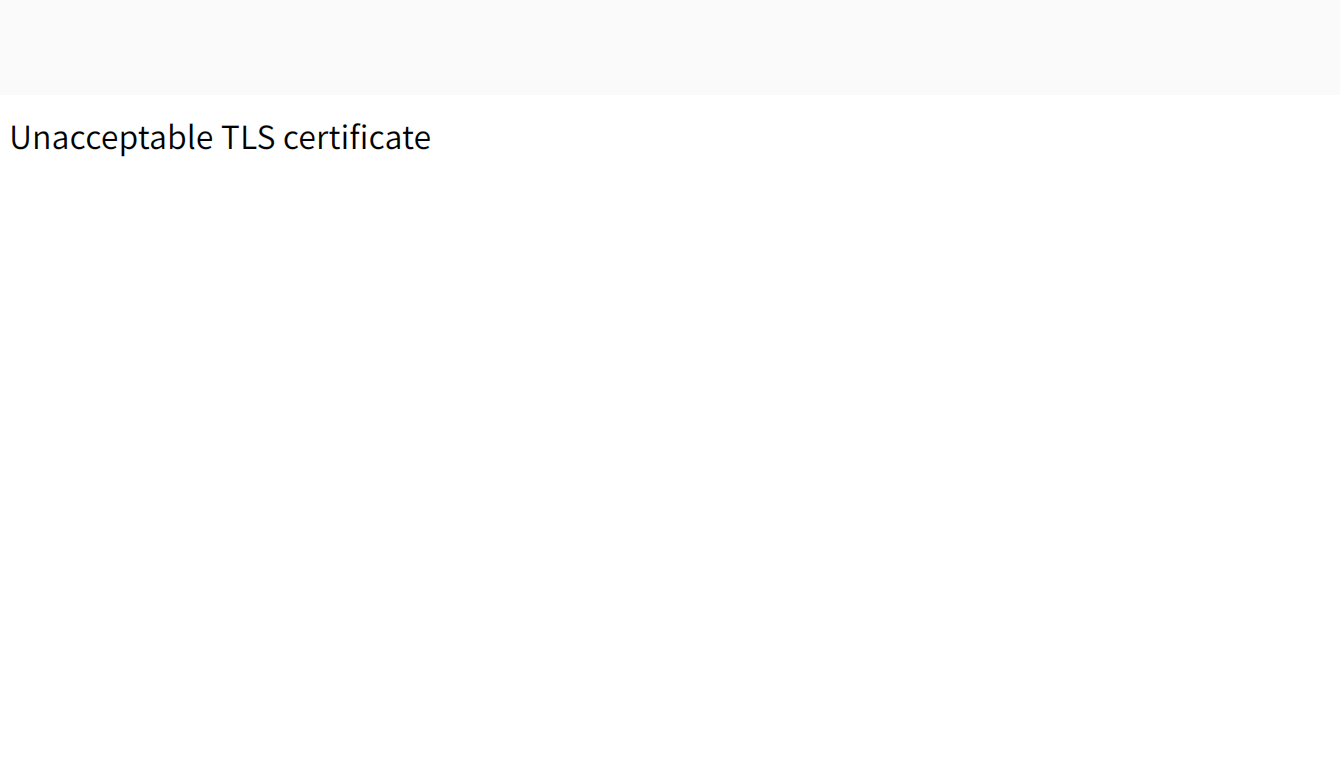
但是相同的页面使用 FireFox/Safari/Chrome/IE/Edge 等主流浏览器打开都是正常显示的。
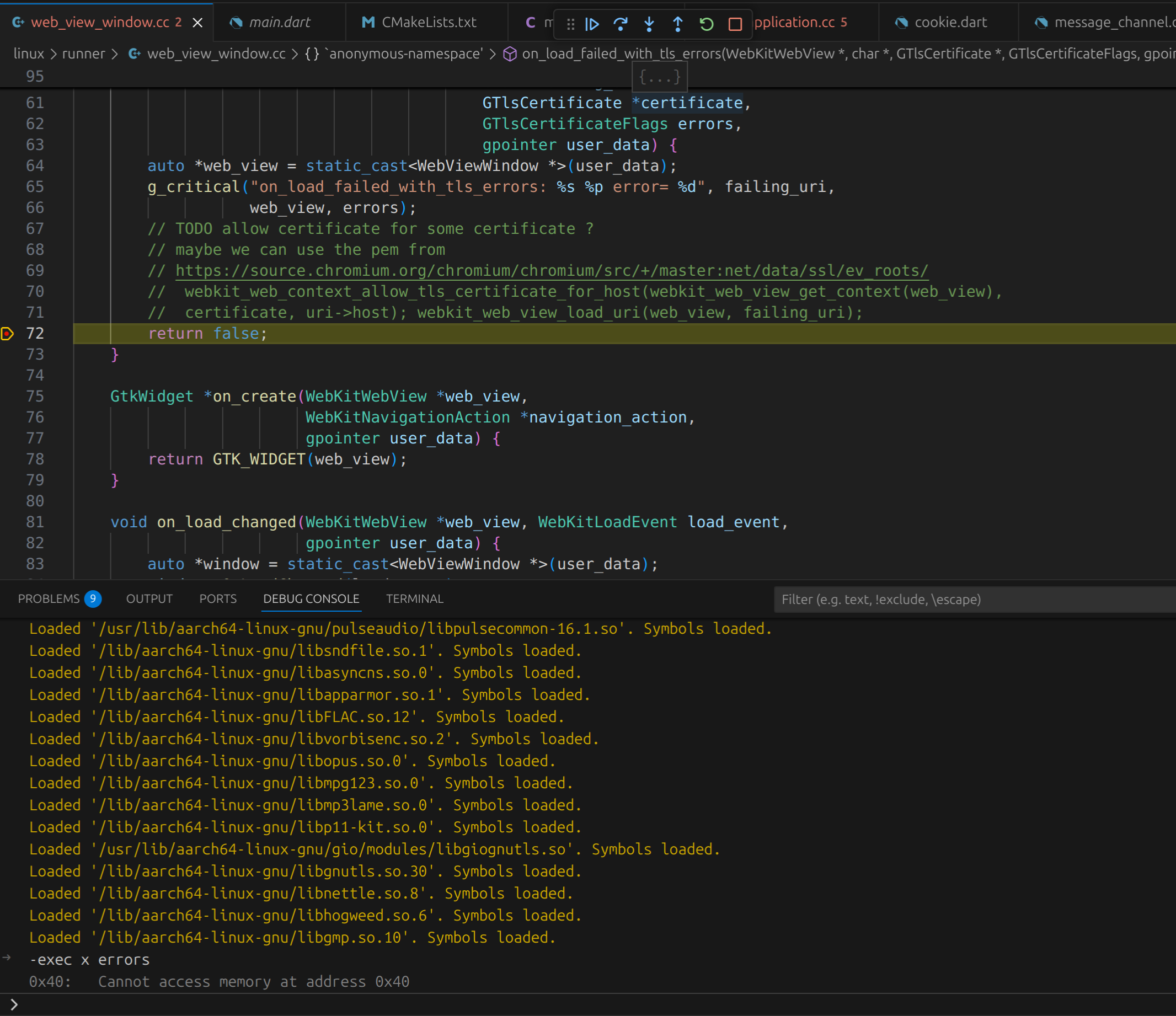
调试代码,发现是 WebKitWebView 的 on_load_failed_with_tls_errors 回调函数返回了错误 G_TLS_CERTIFICATE_GENERIC_ERROR(64),如下图:
于是安装 Gnome 官方的浏览器 Epiphany 进行测试,该浏览器底层也是调用 WebKit2GTK,在 ubuntu 24.04 系统,可以执行如下命令进行安装:
|
1 |
$ sudo apt install epiphany-browser |
打开相同的页面,同样报错,显示服务器不可信。
由于 WebKit2GTK 底层的 TLS 通信调用库调用的是 GnuTLS 。于是尝试通过命令行对 TLS 证书认证过程进行验证,执行如下命令:
|
1 2 3 4 5 6 7 8 9 10 11 12 13 14 15 16 |
$ sudo apt install gnutls-bin $ gnutls-cli www.xxxx.com Processed 146 CA certificate(s). Resolving 'www.xxxx.com:443'... Connecting to 'xxx.xxx.xxx.xxx:443'... ........................................................................ ........................................................................ - Certificate[4] info: - subject `CN=Baltimore CyberTrust Root,OU=CyberTrust,O=Baltimore,C=IE', issuer `CN=Baltimore CyberTrust Root,OU=CyberTrust,O=Baltimore,C=IE', serial xxxxxx, RSA key 2048 bits, signed using RSA-SHA1 (broken!), activated `xxxx-xx-xx xx:xx:xx UTC', expires `xxxx-xx-xx xx:xx:xx UTC', pin-sha256="xxxxxxxxxxxxxxxxxxxxxxxxxxxxxxxxxxxxxxx" - Status: The certificate is NOT trusted. The certificate chain violates the signer's constraints. *** PKI verification of server certificate failed... *** Fatal error: Error in the certificate. |
可以看到,网站的根证书无法通过 GnuTLS 的验证,原因在于网站的证书链中的根证书使用的 RSA-SHA1 签名,该类型签名存在 “弱哈希算法签名的SSL证书(CVE-2004-2761)漏洞” 进而被 GnuTLS 拒绝。
针对此问题的更详细的描述参考 GnuTLS 文档 8.2 Disabling algorithms and protocols 。
针对此问题的解决方法:
联系网站,更新证书,重新以 RSA-SHA256 签发证书。由于是公司内部网址,因此联系网络更新即可;
应用内嵌网站证书,通过 webkit_web_context_allow_tls_certificate_for_host 要求 webkit 通过提供的证书进行网站验证。此种情况适用于 APP 内嵌自己网站页面的情况,同样适用于自签名证书的情况;
如果纯粹测试,可以在加载页面之前调用
|
1 2 3 4 5 6 7 8 9 |
// 网站证书存在问题,此处仅为测试场景下,临时关闭TLS证书验证 auto context = webkit_web_view_get_context(WEBKIT_WEB_VIEW(web_view_)); // 低版本 4.0 webkit_web_context_set_tls_errors_policy(context, WEBKIT_TLS_ERRORS_POLICY_IGNORE); // 高版本 4.1 auto manager = webkit_web_context_get_website_data_manager(context); webkit_website_data_manager_set_tls_errors_policy(manager, WEBKIT_TLS_ERRORS_POLICY_IGNORE); |
要求 webkit 无视证书错误。此方法生产环境不可取,非常不安全,仅可用于内部测试;
此方案目前测试已经不可用:调用 gnutls_sign_set_secure_for_certs API 许可部分不安全的证书签名算法
|
1 2 3 4 5 6 |
// pkg_check_modules(GnuTLS REQUIRED IMPORTED_TARGET gnutls>=3.7.3) // target_link_libraries(${BINARY_NAME} PRIVATE PkgConfig::GnuTLS) // #include <gnutls/gnutls.h> gnutls_sign_set_secure_for_certs(GNUTLS_SIGN_RSA_SHA1, 1); |
相对来说,联系不上网站的情况下,又需要在保证安全的前提下,尽量兼容网站,推荐此种方式;
自行接管证书验证过程,实现比较复杂,极其容易产生安全漏洞,不建议;
在使用 Visual Studio Code (1.97.2) 进行 GDB 调试时,想使用 x 命令看一下某地址处的数值。出现如下报错:
|
1 |
-var-create: unable to create variable object |
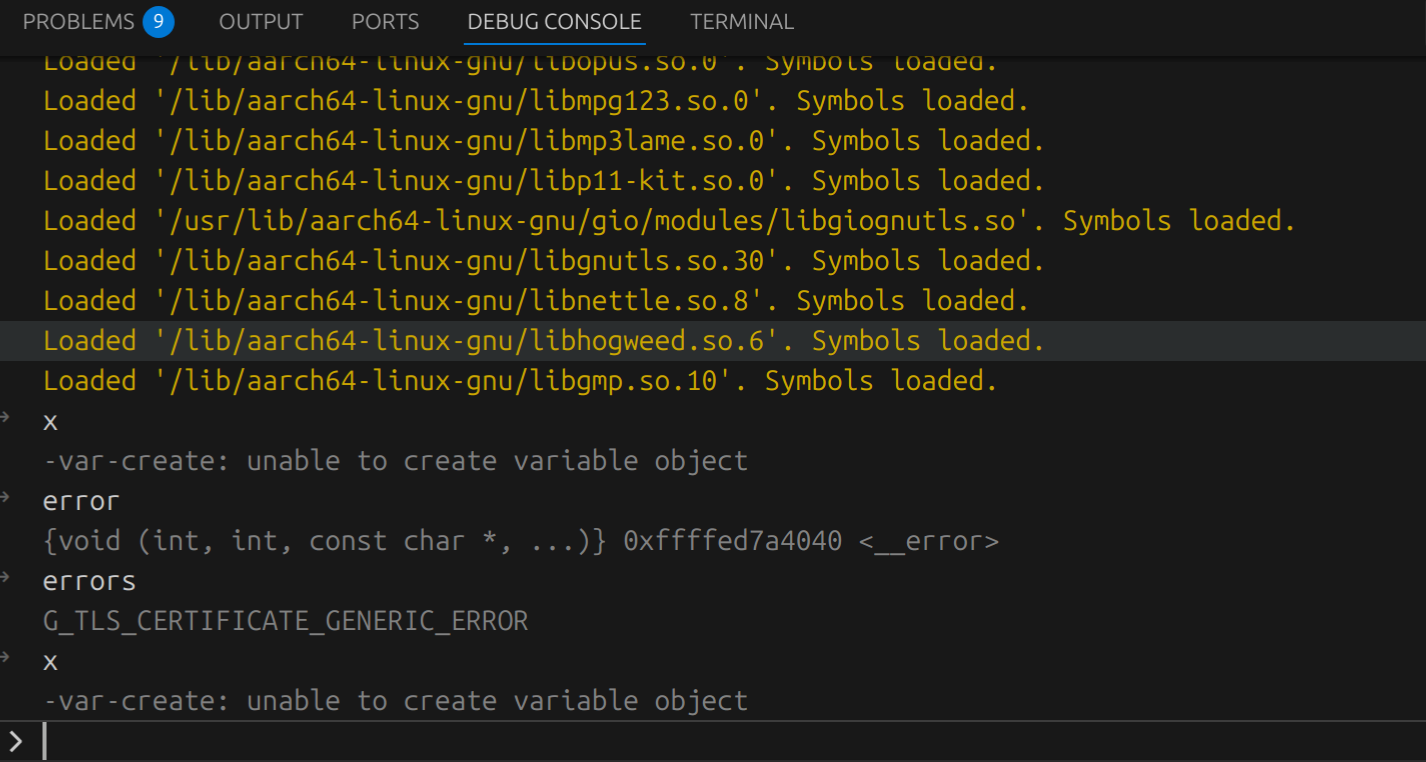
其实,在刚刚开始调试程序时,就以黄色字体给出了解决方案。

|
1 |
Execute debugger commands using "-exec <command>", for example "-exec info registers" will list registers in use (when GDB is the debugger) |
也就是说:
如果是想查看某个变量的值,直接在输入框里输入变量名就好了;
如果要执行GDB命令,则需要加-exec前缀,如下图:
0、参考链接
|
1 2 3 4 5 6 7 8 |
密码行业标准化技术委员会 http://www.gmbz.org.cn/main/bzlb.html SM2密码算法使用规范 http://www.gmbz.org.cn/main/viewfile/2018011001400692565.html SM2密码算法应用分析 https://blog.csdn.net/arlaichin/article/details/23708155?utm_source=itdadao&utm_medium=referral 技术科普 | 国密算法在Ultrain区块链中的运用 https://blog.csdn.net/Tramp_1/article/details/111603396 |
1、SM2数字信封格式:
|
1 2 3 4 5 6 7 8 9 10 11 12 13 14 15 16 17 18 19 20 21 22 23 24 25 26 27 28 29 30 31 32 33 34 35 36 37 38 39 40 41 42 43 44 45 46 47 48 49 50 51 52 53 54 55 56 57 58 59 60 61 62 63 64 65 66 67 68 69 70 71 72 73 74 75 76 77 78 79 80 81 82 83 84 |
有效部分 公钥:04|X|Y,共65字节 私钥:整数,共32字节 SM2EnvelopedKey ::= SEQUENCE { symalgid AlgorithmIdentifier, -- 对称算法ID symalgkey SM2Cipher, -- 对称算法密钥(被签名证书公钥加密) asympubkey BIT STRING, -- 加密证书公钥 asymprvkey BIT STRING -- 加密证书私钥(被对称算法加密) } typedef struct SM2Cipher_st { ASN1_INTEGER *xCoordinate; // x分量(随机,非公钥) ASN1_INTEGER *yCoordinate; // y分量(随机,非公钥) ASN1_OCTET_STRING *hash; // 杂凑值 ASN1_OCTET_STRING *cipherText; // 密文 } SM2Cipher; AlgorithmIdentifier ::= SEQUENCE { algorithm OBJECT IDENTIFIER, parameters ANY DEFINED BY algorithm OPTIONAL } 区分普通的数字信封格式,见下图(openssl暂不支持SM2算法的私钥P7信封格式生成,但是支持SM2算法私钥的P7解密,生成P7可以在外部使用gmssl命令行生成) typedef struct pkcs7_enveloped_st { ASN1_INTEGER *version; /* version 0 */ STACK_OF(PKCS7_RECIP_INFO) *recipientinfo; PKCS7_ENC_CONTENT *enc_data; } PKCS7_ENVELOPE; typedef struct pkcs7_recip_info_st { ASN1_INTEGER *version; /* version 0 */ PKCS7_ISSUER_AND_SERIAL *issuer_and_serial; X509_ALGOR *key_enc_algor; ASN1_OCTET_STRING *enc_key; X509 *cert; /* get the pub-key from this */ const PKCS7_CTX *ctx; } PKCS7_RECIP_INFO; typedef struct pkcs7_enc_content_st { ASN1_OBJECT *content_type; X509_ALGOR *algorithm; ASN1_OCTET_STRING *enc_data; /* [ 0 ] */ const EVP_CIPHER *cipher; const PKCS7_CTX *ctx; } PKCS7_ENC_CONTENT; typedef struct pkcs7_st { /* * The following is non NULL if it contains ASN1 encoding of this * structure */ unsigned char *asn1; long length; # define PKCS7_S_HEADER 0 # define PKCS7_S_BODY 1 # define PKCS7_S_TAIL 2 int state; /* used during processing */ int detached; ASN1_OBJECT *type; /* content as defined by the type */ /* * all encryption/message digests are applied to the 'contents', leaving * out the 'type' field. */ union { char *ptr; /* NID_pkcs7_data */ ASN1_OCTET_STRING *data; /* NID_pkcs7_signed */ PKCS7_SIGNED *sign; /* NID_pkcs7_enveloped */ PKCS7_ENVELOPE *enveloped; /* NID_pkcs7_signedAndEnveloped */ PKCS7_SIGN_ENVELOPE *signed_and_enveloped; /* NID_pkcs7_digest */ PKCS7_DIGEST *digest; /* NID_pkcs7_encrypted */ PKCS7_ENCRYPT *encrypted; /* Anything else */ ASN1_TYPE *other; } d; PKCS7_CTX ctx; } PKCS7; |
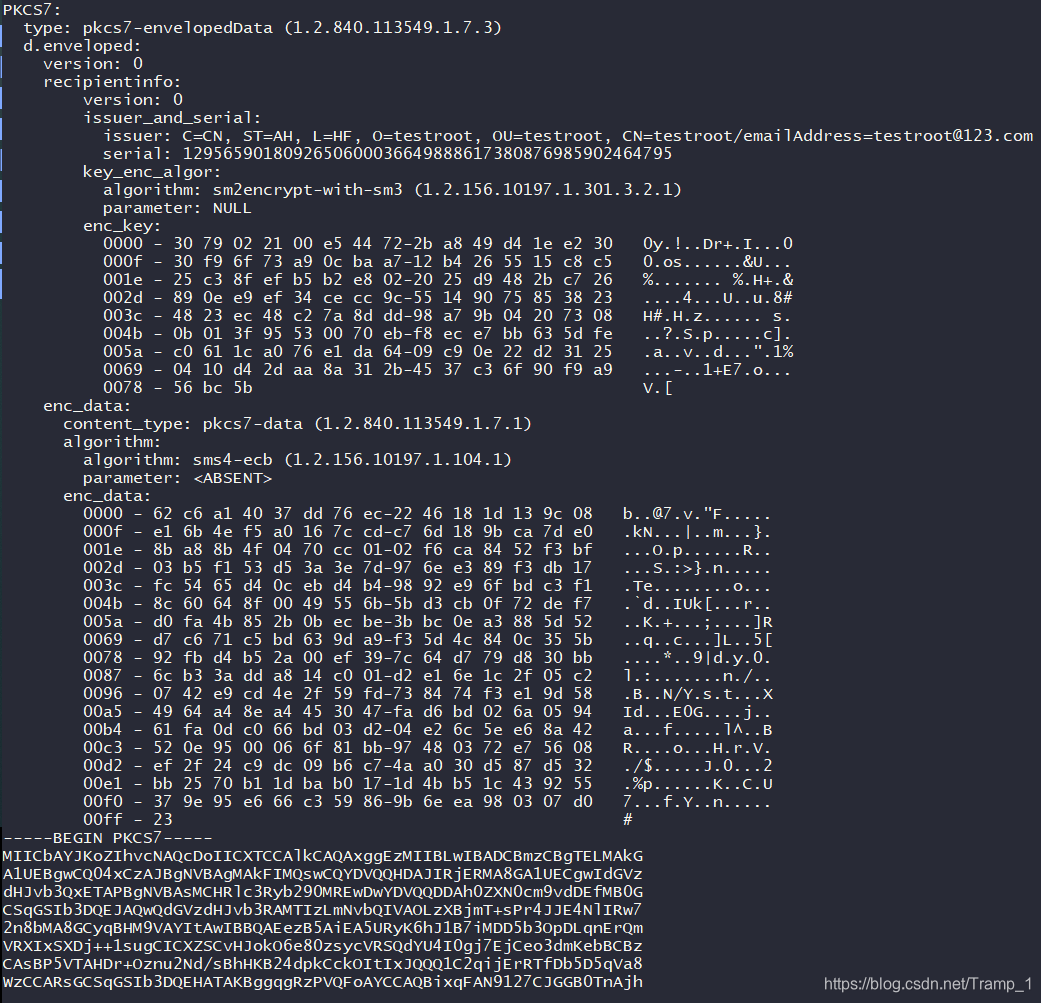
2、代码中SM2数字信封加密解密步骤
|
1 2 3 4 5 6 7 8 9 10 11 |
1、将加密证书私钥转换为DER格式(二进制) 2、设置对称算法ID,公钥有效数据部分,私钥有效数据部分 对称算法ID默认为0x2A, 0x81, 0x1C, 0xCF, 0x55, 0x01, 0x68, 0x01(即SM4_ECB,1.2.156.10197.1.104.1) 公钥数据前缀为0xA1, 0x44, 0x03, 0x42, 0x00,截取65字节明文 私钥数据前缀为0x02, 0x01, 0x01, 0x04, 0x20,截取32字节明文 3、创建对称密钥,加密私钥有效数据部分 使用SM4_ECB算法和创建的128位随机密钥,加密私钥32字节得到32字节密文 4、使用签名公钥加密对称密钥,密文转换为二进制 使用SM2算法加密128位对称密钥,得到对称密钥密文(此处我使用了openssl已实现的SM2算法加密,因此不需要按照国标文档里深入底层计算预处理结果) 5、将对称算法ID,对称密钥密文,公钥,私钥密文转换为信封格式数据(此处可以参考openssl内部代码实现结构体和i2d格式转换) 6、将DER二进制信封转换为PEM格式(Base64),输出 |
解密(将SM2数字信封格式转换为加密私钥)
|
1 2 3 4 5 6 7 8 9 10 11 |
1、P7(PEM格式)转二进制 2、解析二进制,得到对称算法ID,对称算法密钥密文,加密证书公钥,加密证书私钥密文二进制 3、对称算法ID转具体算法名称 二进制字符串ID转换为OID(1.2.156.10197.1.104.1)进行匹配 4、签名私钥解密,得到对称算法密钥 使用SM2算法解密对称密钥密文,得到对称密钥明文 5、对称算法解密,得到加密私钥有效数据,32字节 使用SM4_ECB算法和对称密钥明文,解密私钥32字节密文得到32字节明文 6、拼接公钥,私钥得到完整加密私钥der二进制格式,有两种方式(此处拼接方法是我自己创造的,有什么其他好方法欢迎共享) (1)"30770201010420" + 32字节私钥 + "A00A06082A811CCF5501822DA144034200" + 65字节公钥 (2)"308187020100301306072A8648CE3D020106082A811CCF5501822D046D306B0201010420" + 32字节私钥 + "A144034200" + 65字节公钥 7、转换DER得到PEM格式文件 |
3、SM2数字信封格式详解
|
1 2 3 4 5 6 7 8 9 10 11 12 13 14 15 16 17 18 19 20 21 22 23 24 25 26 27 28 29 30 31 32 33 34 35 36 37 38 39 40 41 42 43 44 45 46 47 48 49 50 51 52 53 54 55 56 57 58 59 60 61 |
P7 PEM格式(Base64) MIHtMAkGByqBHM9VAWgweQIgMtHF6qRZOKJxnT5MYSv4eK/LjJHmp7b/p7AaP6cqigkCIQCFpr2MmakaMxVH1u+Yzxf+oJSFETwiZacB4j3NohlbHwQgO50Hic8tDYBLedIbuqsS2lXvPDYtyuLUrQKyGRI1Y9gEEA5lnd3Yxujfedxk6Cam9ygDQgAEnrxloYKoCRYc3Lh96OYupmT7V7X/BBgdcfCMQnsB7nQhD6FVwgKoN0JMwMqHXGg6l891FCfuTh5N51YqOAqBwwMhAHiB9UgemN+Xz39qsdMeVl4SKdmHHkPkKmNOBJjoqHor P7二进制 3081ED300906072A811CCF5501683079022032D1C5EAA45938A2719D3E4C612BF878AFCB8C91E6A7B6FFA7B01A3FA72A8A0902210085A6BD8C99A91A331547D6EF98CF17FEA09485113C2265A701E23DCDA2195B1F04203B9D0789CF2D0D804B79D21BBAAB12DA55EF3C362DCAE2D4AD02B219123563D804100E659DDDD8C6E8DF79DC64E826A6F728034200049EBC65A182A809161CDCB87DE8E62EA664FB57B5FF04181D71F08C427B01EE74210FA155C202A837424CC0CA875C683A97CF751427EE4E1E4DE7562A380A81C30321007881F5481E98DF97CF7F6AB1D31E565E1229D9871E43E42A634E0498E8A87A2B 主要包含(1)(2)(3)(4) 3081ED30090607 (1)对称算法ID:SM4 2A811CCF550168 (2)对称算法密钥密文(SM2加密): 3079022032d1c5eaa45938a2719d3e4c612bf878afcb8c91e6a7b6ffa7b01a3fa72a8a0902210085a6bd8c99a91a331547d6ef98cf17fea09485113c2265a701e23dcda2195b1f04203b9d0789cf2d0d804b79d21bbaab12da55ef3c362dcae2d4ad02b219123563d804100e659dddd8c6e8df79dc64e826a6f728 拆解后: 30790220 x:32d1c5eaa45938a2719d3e4c612bf878afcb8c91e6a7b6ffa7b01a3fa72a8a09 022100 y:85a6bd8c99a91a331547d6ef98cf17fea09485113c2265a701e23dcda2195b1f 0420 m:3b9d0789cf2d0d804b79d21bbaab12da55ef3c362dcae2d4ad02b219123563d8 0410 c:0e659dddd8c6e8df79dc64e826a6f728 (c结构密文) 04|x|y|m|c 0432D1C5EAA45938A2719D3E4C612BF878AFCB8C91E6A7B6FFA7B01A3FA72A8A0985A6BD8C99A91A331547D6EF98CF17FEA09485113C2265A701E23DCDA2195B1F3B9D0789CF2D0D804B79D21BBAAB12DA55EF3C362DCAE2D4AD02B219123563D80E659DDDD8C6E8DF79DC64E826A6F728 使用SM2签名私钥解密(2)后得到 对称密钥明文:EP/+Xo55MBhI3e1GTyghhQ==:10FFFE5E8E79301848DDED464F282185 (3)加密证书公钥: 034200 有效数据明文(65B):049ebc65a182a809161cdcb87de8e62ea664fb57b5ff04181d71f08c427b01ee74210fa155c202a837424cc0ca875c683a97cf751427ee4e1e4de7562a380a81c3 (4)加密证书私钥(加密): 032100 有效数据密文(32B):7881f5481e98df97cf7f6ab1d31e565e1229d9871e43e42a634e0498e8a87a2b 使用(2)中对称密钥解密得到SM2私钥有效数据明文 cipher.txt.bin:7881f5481e98df97cf7f6ab1d31e565e1229d9871e43e42a634e0498e8a87a2b #需要将十六进制转换为二进制文件 openssl enc -d -sm4-ecb -in cipher.txt.bin -K 10FFFE5E8E79301848DDED464F282185 -p -out plain.txt.bin #解密得到明文 加密验证 plain.txt.bin:71e49d78b44c6fd54331869f343c537c0a736954ae22cd50277ae587a7e6762e #需要将十六进制转换为二进制文件 openssl enc -e -sm4-ecb -nopad -in plain.txt.bin -K 10FFFE5E8E79301848DDED464F282185 -p -out cipher.txt.bin #使用明文加密得到 加密证书公钥DER: 3059301306072a8648ce3d020106082a811ccf5501822d034200 049ebc65a182a809161cdcb87de8e62ea664fb57b5ff04181d71f08c427b01ee74210fa155c202a837424cc0ca875c683a97cf751427ee4e1e4de7562a380a81c3 加密证书私钥DER(格式1): 308187020100301306072A8648CE3D020106082A811CCF5501822D046D306B0201010420 私钥有效数据 71E49D78B44C6FD54331869F343C537C0A736954AE22CD50277AE587A7E6762E A144034200 公钥有效数据049EBC65A182A809161CDCB87DE8E62EA664FB57B5FF04181D71F08C427B01EE74210FA155C202A837424CC0CA875C683A97CF751427EE4E1E4DE7562A380A81C3 加密证书私钥DER(格式2): 30770201010420 私钥有效数据 71e49d78b44c6fd54331869f343c537c0a736954ae22cd50277ae587a7e6762e a00a06082a811ccf5501822d a144034200 公钥有效数据 049ebc65a182a809161cdcb87de8e62ea664fb57b5ff04181d71f08c427b01ee74210fa155c202a837424cc0ca875c683a97cf751427ee4e1e4de7562a380a81c3 |