Flutter Web 调试问题: Assertion Failed on Text Input Click in Chrome (Flutter 3.27.0, Dart 3.6.0)
前置条件
- Flutter 版本: 3.27.0 / 3.27.1 / 3.27.2
- Dart 版本: 3.6.0
- 编译器: Android Studio Ladybug | 2024.2.1 Patch 3
- 操作系统: macOS Sequoia 15.2 (Apple M2) / Windows 11 专业版 23H2
- 浏览器: Chrome (131.0.6778.205)
问题描述
直接从 Flutter API 官方页面(Form Class Documentation)复制 Form 示例,并使用 Flutter 的 Web 调试模式运行。
尝试用鼠标单击文本输入时,遇到以下错误:
|
1 2 3 4 5 6 7 8 9 10 11 12 |
DartError: Assertion failed: org-dartlang-sdk:///lib/_engine/engine/pointer_binding/event_position_helper.dart:70:10 targetElement == domElement "The targeted input element must be the active input element" dart-sdk/lib/_internal/js_dev_runtime/private/ddc_runtime/errors.dart 288:3 throw_ dart-sdk/lib/_internal/js_dev_runtime/private/profile.dart 110:39 assertFailed dart-sdk/lib/_internal/js_dev_runtime/private/profile.dart 110:39 _computeOffsetForInputs lib/_engine/engine/pointer_binding/event_position_helper.dart 38:14 computeEventOffsetToTarget lib/_engine/engine/pointer_binding.dart 1088:30 [_convertEventsToPointerData] lib/_engine/engine/pointer_binding.dart 1016:9 <fn> lib/_engine/engine/pointer_binding.dart 948:7 <fn> lib/_engine/engine/pointer_binding.dart 541:9 loggedHandler dart-sdk/lib/_internal/js_dev_runtime/patch/js_allow_interop_patch.dart 212:27 _callDartFunctionFast1 |
这个问题是 Flutter 3.27.0 / 3.27.1 / 3.27.2 的缺陷,官方已经在 Flutter 3.27.3 / 3.28 版本修复,后续升级到 Flutter 3.27.3 / 3.28 即可解决此问题。
目前(2024/12/23) master 通道已经修复这个问题,可以通过切换到 master 通道来解决:
|
1 |
$ flutter channel master |
目前(2025/01/25) Flutter 3.27.3 已经修复这个问题,升级到此版本可以修复问题。
参考链接
- Flutter Web 调试问题:Chrome 中文本输入点击断言失败(Flutter 3.27.0、Dart 3.6.0)
- Flutter web 3.27 debug - TextFormField - DartError event_position_helper.dart:70:10 - The targeted input element must be the active input element #160155
- Flutter Web Debugging Issue: Assertion Failed on Text Input Click in Chrome (Flutter 3.27.0, Dart 3.6.0)
启动C:\Windows\System32\logiLDA.DLL时出现问题,找不到指定模块
Windows 11 每次开机都会弹出下图所示的信息:
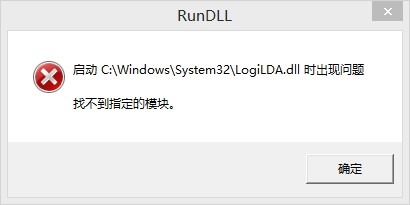
经过查找是罗技鼠标驱动的问题,驱动卸载之后,系统重启还是会弹对话框。
具体做法是:
1. 运行、输入 regedit
2. 找到 HKEY_LOCAL_MACHINE\Software\Microsoft\Windows\CurrentVersion\Run 目录下的 Logitech Download Assistant
3. 右键删除即可
参考链接
Windows 11 Version 21H2 更新提示 “你的设备缺少重要的安全更新。”
最近 (2024/12/24) 家里的电脑在 Windows 更新界面提示 “你的设备缺少重要的安全更新。请确保设备保持打开状态并接通电源,以便更新可以完成。”
如下图:
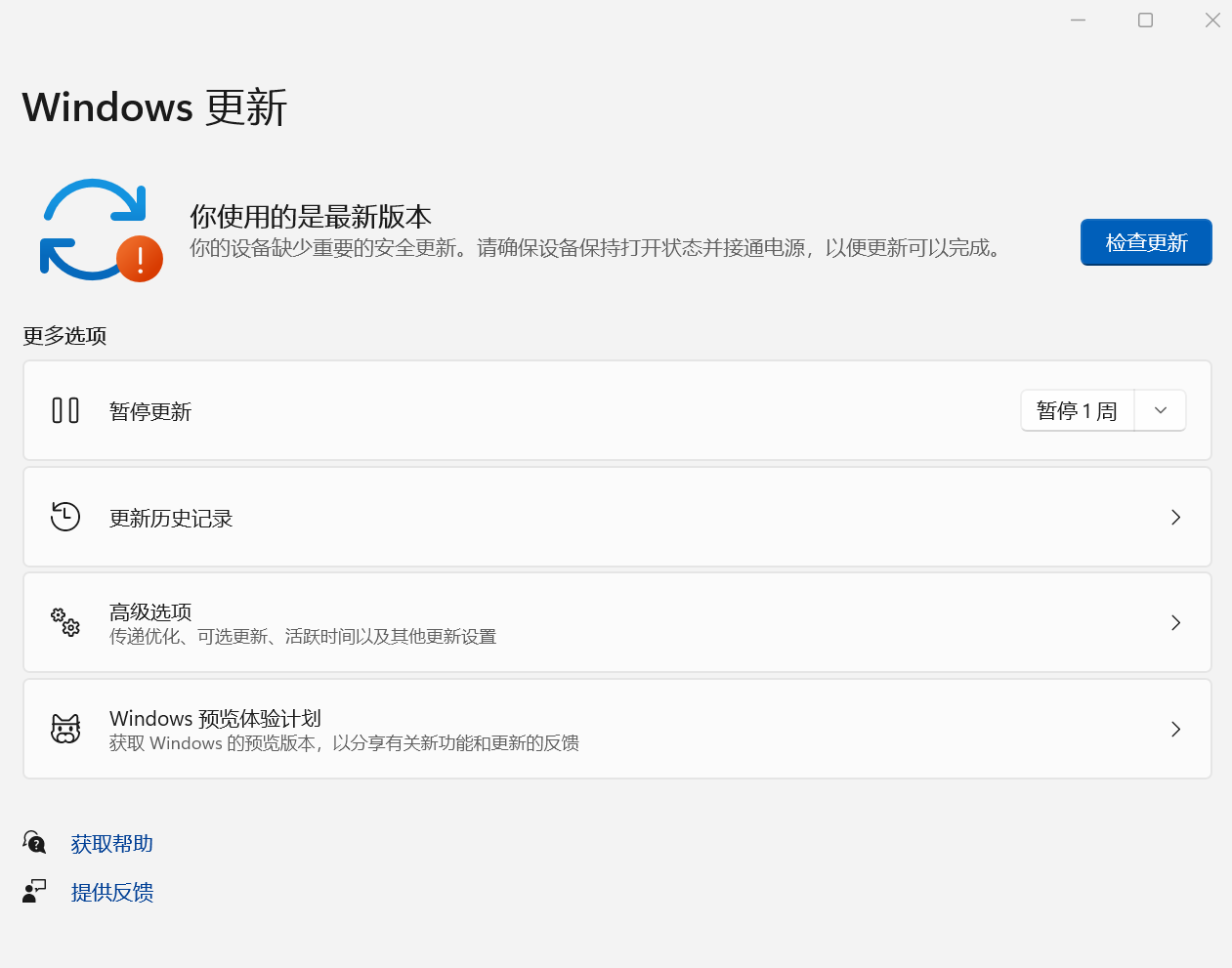
不管如何点击刷新重试,都会出现上述提示。
系统版本为 Windows 11 Version 21H2,详细信息参考下图:

原因为 Windows 11 Version 21H2 已经在 2023/10/10 终止服务,所以已经无法更新系统补丁。如下图:
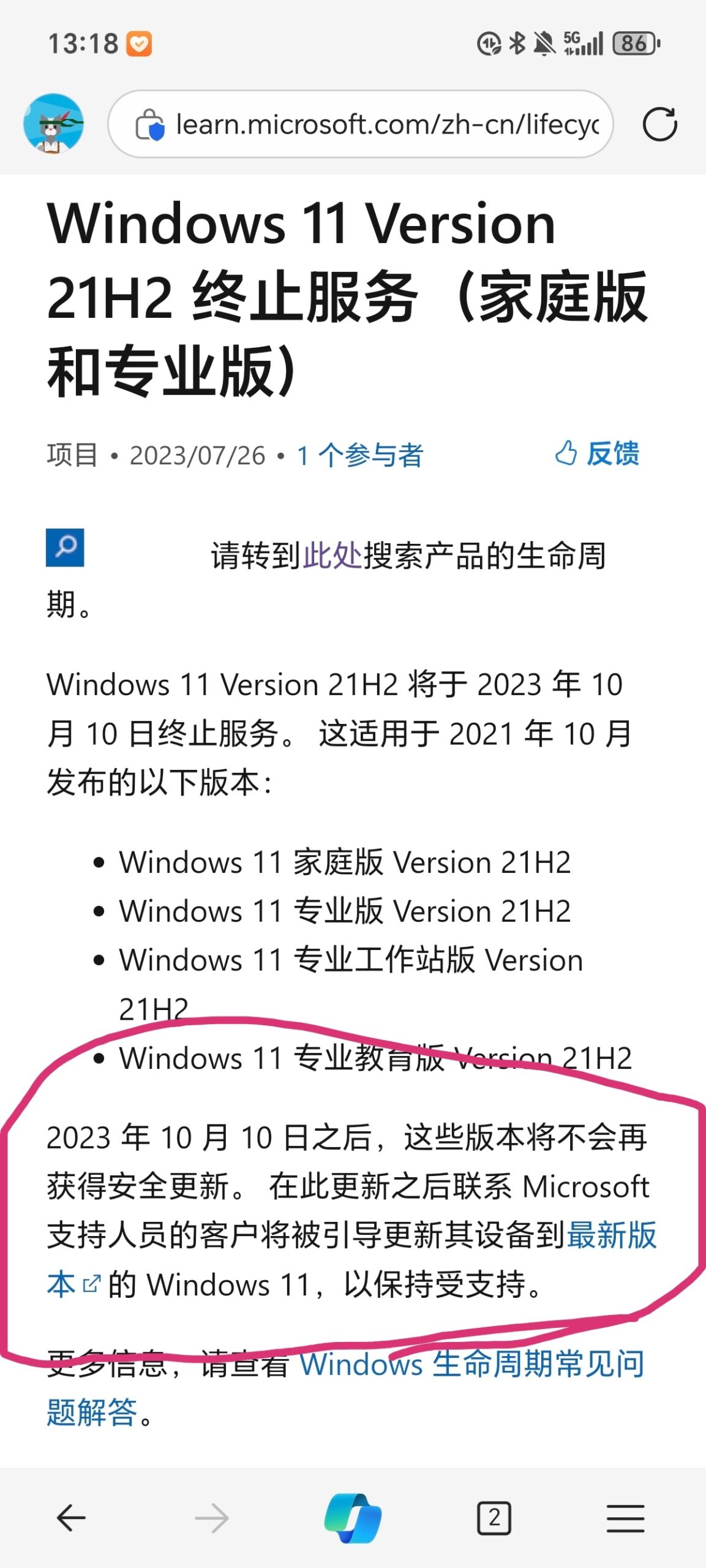
解决方法就是安装依旧提供支持的系统版本 Windows 11 Version 23H2 或者 Windows 11 Version 24H2 。
需要注意的是,升级到 24H2 无法保留已经安装的软件,因此当前 (2024/12/24) 只能升级到 23H2 。
对于不支持的硬件进行升级安装,可以通过 Rufus 写入到 U盘后,不重启电脑,直接点击 U 盘上的安装文件进行安装,可以正常完成系统升级。
如下图:
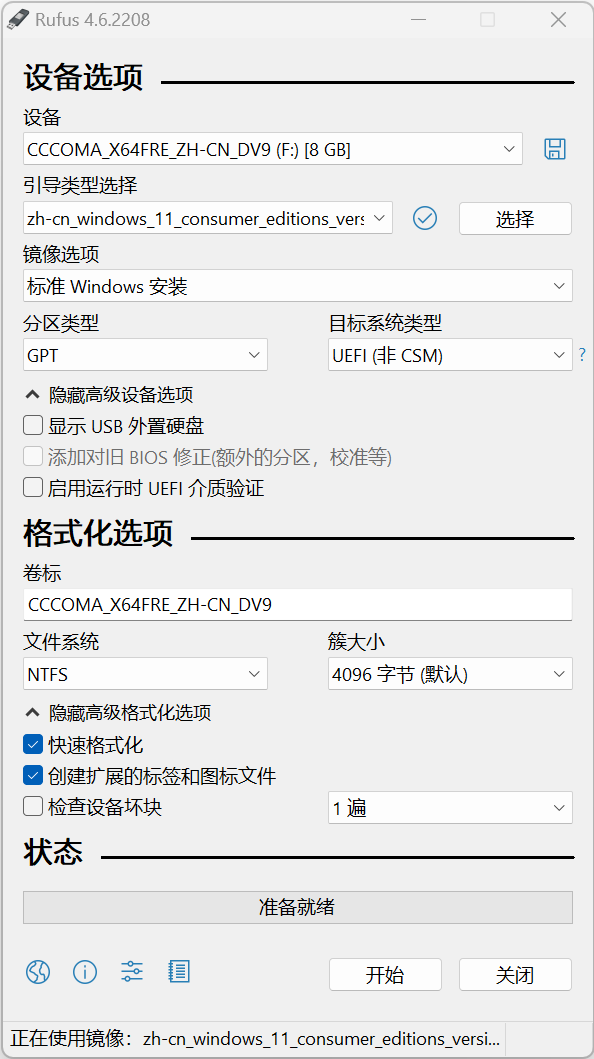
点击开始会弹出如下信息,保持信息不变即可,如下图:

参考链接
OpenSCAD圆角矩形
OpenSCAD实现圆角矩形,可以参考如下代码:
|
1 2 3 4 5 6 7 8 9 10 11 12 13 14 15 16 17 18 19 20 21 22 23 24 25 26 27 28 29 30 31 32 33 34 35 36 37 38 39 40 41 42 43 |
// 圆角矩形模块代码 module roundedcube(xx, yy, height, radius) { difference() { cube([xx, yy, height]); difference() { translate([-.5, -.5, -.2]) cube([radius + .5, radius + .5, height + .5]); translate([radius, radius, height / 2]) cylinder(height, radius, radius, true); } translate([xx, 0, 0]) rotate(90) difference() { translate([-.5, -.5, -.2]) cube([radius + .5, radius + .5, height + .5]); translate([radius, radius, height / 2]) cylinder(height, radius, radius, true); } translate([xx, yy, 0]) rotate(180) difference() { translate([-.5, -.5, -.2]) cube([radius + .5, radius + .5, height + .5]); translate([radius, radius, height / 2]) cylinder(height, radius, radius, true); } translate([0, yy, 0]) rotate(270) difference() { translate([-.5, -.5, -.2]) cube([radius + .5, radius + .5, height + .5]); translate([radius, radius, height / 2]) cylinder(height, radius, radius, true); } } } |
参考链接
Could not find a command named "/data/Android/flutter/bin/cache/dart-sdk/bin/snapshots/frontend_server.dart.snapshot"
经过多次的 Flutter 版本升级,以前的老项目脚本在执行 flutter pub get 相关的命令时候报错如下:
|
1 2 3 4 5 6 7 8 9 10 11 12 13 14 15 16 17 18 19 20 21 22 23 24 25 26 27 28 29 30 31 32 33 34 35 36 37 38 |
$ /bin/bash /home/xxxx/xxx/build_runner.sh Resolving dependencies in `/home/xxxx/xxxx`... Downloading packages... Got dependencies in `/home/xxxx/xxx`. Building package executable... (3.1s) Built custom_lint:custom_lint. Analyzing... 0.0s No issues found! Building package executable... (3.3s) Built build_runner:build_runner. [INFO] Generating build script completed, took 297ms [INFO] Precompiling build script......Could not find a command named "/data/Android/flutter/bin/cache/dart-sdk/bin/snapshots/frontend_server.dart.snapshot". Usage: dart <command|dart-file> [arguments] Global options: -v, --verbose Show additional command output. --version Print the Dart SDK version. --enable-analytics Enable analytics. --disable-analytics Disable analytics. --suppress-analytics Disallow analytics for this `dart *` run without changing the analytics configuration. -h, --help Print this usage information. Available commands: analyze Analyze Dart code in a directory. compile Compile Dart to various formats. create Create a new Dart project. devtools Open DevTools (optionally connecting to an existing application). doc Generate API documentation for Dart projects. fix Apply automated fixes to Dart source code. format Idiomatically format Dart source code. info Show diagnostic information about the installed tooling. pub Work with packages. run Run a Dart program. test Run tests for a project. Run "dart help <command>" for more information about a command. |
解决方法为删除项目下的所有 pubspec.lock 文件即可。
参考链接
Caught error: Unsupported operation: Platform._operatingSystem
Flutter 代码运行在 Chrome 上的时候报错 “Caught error: Unsupported operation: Platform._operatingSystem”。
报错的原因是因为代码中使用了 Platform.isIOS、Platform.isAndroid 等函数判断系统类型,可惜的是,这些函数并不能在 Chrome 上运行。
修改方法就是自己封装一个自定义工具类,先使用 kIsWeb 排除一下浏览器。参考如下:
|
1 2 3 4 5 6 7 8 9 10 11 12 13 14 15 |
import 'dart:io'; import 'package:flutter/foundation.dart'; class PlatformKit { /// 是否是移动设备,如果系统是 Android 、iOS 则返回 true 否则返回 false static bool isMobile() { return (!kIsWeb) && (Platform.isAndroid || Platform.isIOS); } /// 是否是macOS,如果系统 macOS 则返回 true 否则返回 false static bool isMacOS() { return (!kIsWeb) && Platform.isMacOS; } } |
参考链接
Flutter Web 警告 Local variable for "serviceWorkerVersion" is deprecated
升级到 Flutter 3.22.0 之后,在 Chrome 上运行 Flutter Web 应用程序时收到以下警告:
|
1 2 3 |
Launching lib/main.dart on Chrome in debug mode... Waiting for connection from debug service on Chrome... Warning: In index.html:40: Local variable for "serviceWorkerVersion" is deprecated. Use "{{flutter_service_worker_version}}" template token instead. See https://docs.flutter.dev/platform-integration/web/initialization for more details. |
这个警告的原因是,新版本的 Flutter Web 应用加载 service_worker.js 的方式发生了变化,原来的加载脚本被 {{flutter_bootstrap_js}} 替代。
调整为新的初始化代码即可解决此问题。
原始的代码如下:
|
1 2 3 4 5 6 7 8 9 10 11 12 13 14 15 16 17 18 19 20 21 22 23 24 25 26 27 28 29 30 31 32 33 34 35 36 37 38 39 40 41 42 43 44 45 46 47 48 49 50 51 52 53 54 55 56 57 58 59 60 61 62 63 64 65 66 67 68 69 70 71 72 73 74 75 76 77 78 79 80 81 82 83 84 85 86 87 88 89 90 91 92 93 94 95 96 97 98 99 100 101 102 103 104 |
<!DOCTYPE html> <html> <head> <!-- If you are serving your web app in a path other than the root, change the href value below to reflect the base path you are serving from. The path provided below has to start and end with a slash "/" in order for it to work correctly. For more details: * https://developer.mozilla.org/en-US/docs/Web/HTML/Element/base This is a placeholder for base href that will be replaced by the value of the `--base-href` argument provided to `flutter build`. --> <base href="$FLUTTER_BASE_HREF"> <meta charset="UTF-8"> <meta content="IE=Edge" http-equiv="X-UA-Compatible"> <meta name="description" content="A new Flutter project."> <!-- iOS meta tags & icons --> <meta name="apple-mobile-web-app-capable" content="yes"> <meta name="apple-mobile-web-app-status-bar-style" content="black"> <meta name="apple-mobile-web-app-title" content="xxxx"> <link rel="apple-touch-icon" href="icons/Icon-192.png"> <!-- Favicon --> <link rel="icon" type="image/png" href="favicon.png"/> <title>xxxx</title> <link rel="manifest" href="manifest.json"> </head> <body> <!-- This script installs service_worker.js to provide PWA functionality to application. For more information, see: https://developers.google.com/web/fundamentals/primers/service-workers --> <script> var serviceWorkerVersion = null; var scriptLoaded = false; function loadMainDartJs() { if (scriptLoaded) { return; } scriptLoaded = true; var scriptTag = document.createElement('script'); scriptTag.src = 'main.dart.js'; scriptTag.type = 'application/javascript'; document.body.append(scriptTag); } if ('serviceWorker' in navigator) { // Service workers are supported. Use them. window.addEventListener('load', function () { // Wait for registration to finish before dropping the <script> tag. // Otherwise, the browser will load the script multiple times, // potentially different versions. var serviceWorkerUrl = 'flutter_service_worker.js?v=' + serviceWorkerVersion; navigator.serviceWorker.register(serviceWorkerUrl) .then((reg) => { function waitForActivation(serviceWorker) { serviceWorker.addEventListener('statechange', () => { if (serviceWorker.state == 'activated') { console.log('Installed new service worker.'); loadMainDartJs(); } }); } if (!reg.active && (reg.installing || reg.waiting)) { // No active web worker and we have installed or are installing // one for the first time. Simply wait for it to activate. waitForActivation(reg.installing || reg.waiting); } else if (!reg.active.scriptURL.endsWith(serviceWorkerVersion)) { // When the app updates the serviceWorkerVersion changes, so we // need to ask the service worker to update. console.log('New service worker available.'); reg.update(); waitForActivation(reg.installing); } else { // Existing service worker is still good. console.log('Loading app from service worker.'); loadMainDartJs(); } }); // If service worker doesn't succeed in a reasonable amount of time, // fallback to plaint <script> tag. setTimeout(() => { if (!scriptLoaded) { console.warn( 'Failed to load app from service worker. Falling back to plain <script> tag.', ); loadMainDartJs(); } }, 4000); }); } else { // Service workers not supported. Just drop the <script> tag. loadMainDartJs(); } </script> </body> </html> |
调整后的代码如下:
|
1 2 3 4 5 6 7 8 9 10 11 12 13 14 15 16 17 18 19 20 21 22 23 24 25 26 27 28 29 30 31 32 33 34 35 36 37 38 39 40 41 42 43 |
<!DOCTYPE html> <html> <head> <!-- If you are serving your web app in a path other than the root, change the href value below to reflect the base path you are serving from. The path provided below has to start and end with a slash "/" in order for it to work correctly. For more details: * https://developer.mozilla.org/en-US/docs/Web/HTML/Element/base This is a placeholder for base href that will be replaced by the value of the `--base-href` argument provided to `flutter build`. --> <base href="$FLUTTER_BASE_HREF"> <meta charset="UTF-8"> <meta content="IE=Edge" http-equiv="X-UA-Compatible"> <meta name="description" content="A new Flutter project."> <!-- iOS meta tags & icons --> <meta name="apple-mobile-web-app-capable" content="yes"> <meta name="apple-mobile-web-app-status-bar-style" content="black"> <meta name="apple-mobile-web-app-title" content="xxxx"> <link rel="apple-touch-icon" href="icons/Icon-192.png"> <!-- Favicon --> <link rel="icon" type="image/png" href="favicon.png"/> <title>xxxx</title> <link rel="manifest" href="manifest.json"> </head> <body> <!-- This script installs service_worker.js to provide PWA functionality to application. For more information, see: https://developers.google.com/web/fundamentals/primers/service-workers --> <script> {{flutter_bootstrap_js}} </script> </body> </html> |
参考链接
Ubuntu 22.04 LTS 中安装经典 GNOME Flashback 指南
GNOME Flashback(又名 classic GNOME)是旧 GNOME 3 shell 的一个分支,它使用早期 GNOME 2 技术的布局和原则。它的速度快如闪电,并且在设计上非常轻量级。因此,它非常适合几十年前的老旧硬件。
随着带有现代 GNOME 42 的 Ubuntu 22.04 LTS 的发布,有必要寻找轻量级的桌面环境选项。
此外,GNOME Flashback 很容易安装在现代 Ubuntu Linux 中,你仍然可以享受 Ubuntu 性能而不必关心 GNOME 42、GTK4、libadwaita 之类的东西。
在 Ubuntu 22.04 LTS 中下载并安装经典 GNOME Flashback
按照以下步骤在 Ubuntu 22.04 LTS 中下载并安装经典 GNOME Flashback(Metacity)。
在 Ubuntu 22.04 LTS 中打开终端(CTRL+ALT+T)并运行以下命令。安装大小约为 61MB。
|
1 2 3 |
sudo apt update sudo apt install gnome-session-flashback |
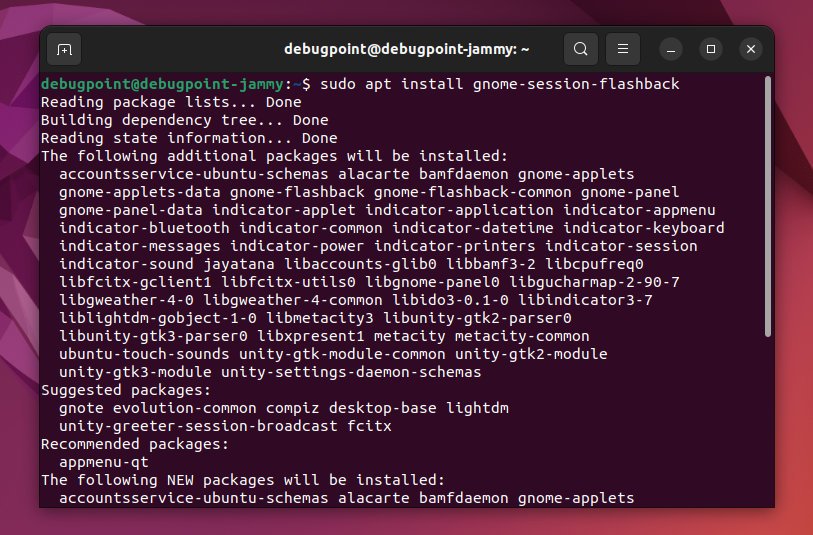
最后,安装完成后,退出。重新登录时,在登录选项中使用经典的 GNOME Flashback(Metacity) 。

经典 GNOME Flashback 的特点
首先,当你登录时,你将体验到传统的 GNOME 技术,它已被证明具有良好的生产力,并且比今天的技术快得多。
在顶部有旧版的面板,左侧是应用菜单,而系统托盘位于桌面的右上方。应用程序菜单显示所有已安装的应用和软件快捷方式,你可以在工作流程中轻松浏览。
此外,在右侧部分,系统托盘具有默认小部件,例如网络、音量控制、日期和时间以及关机菜单。
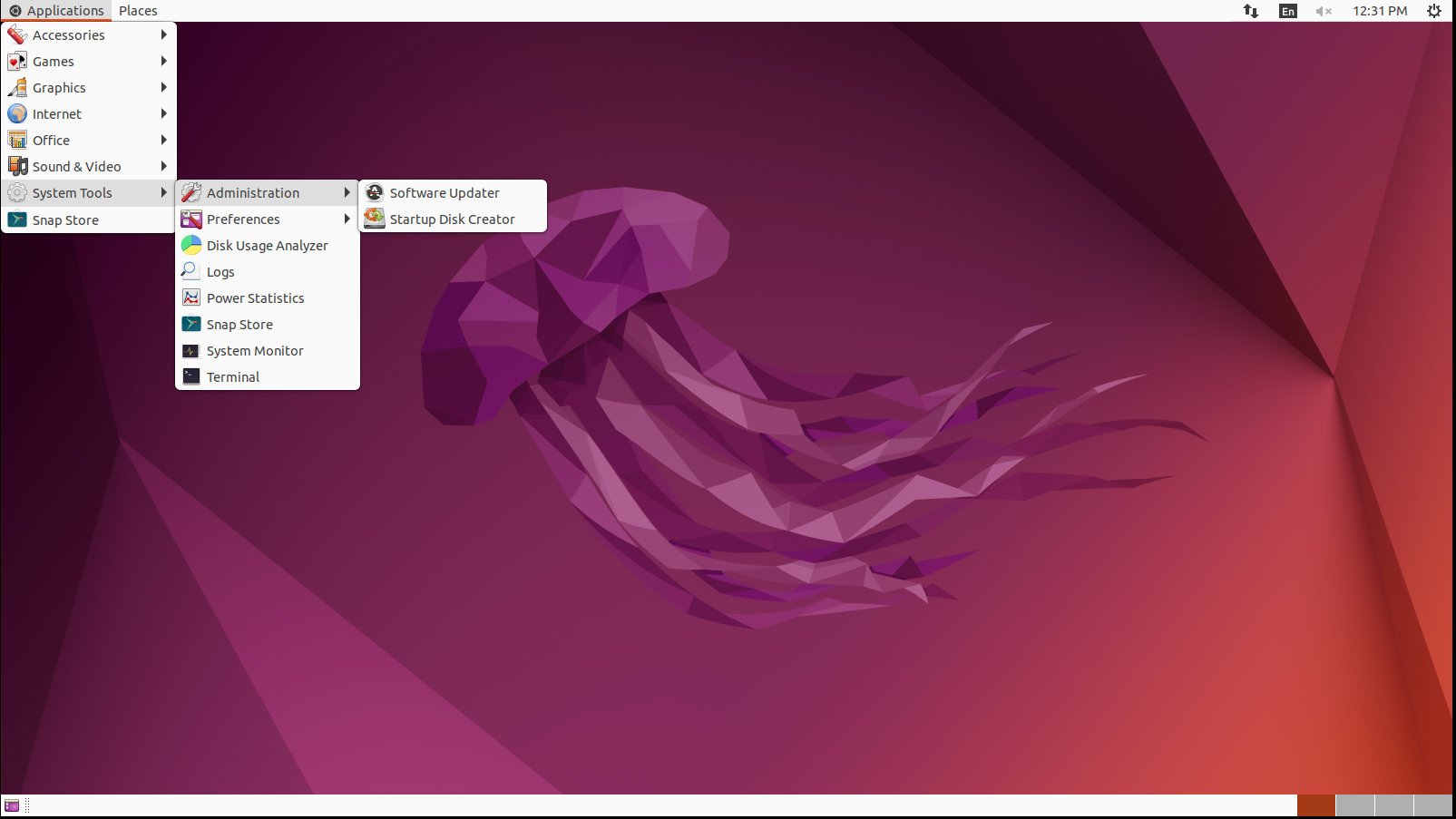
底部面板包含打开的窗口和工作区切换器的应用列表。默认情况下,它为你提供四个工作区供你使用。
此外,你可以随时更改顶部面板的设置以自动隐藏、调整面板大小和背景颜色。
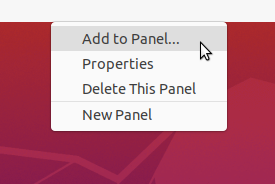
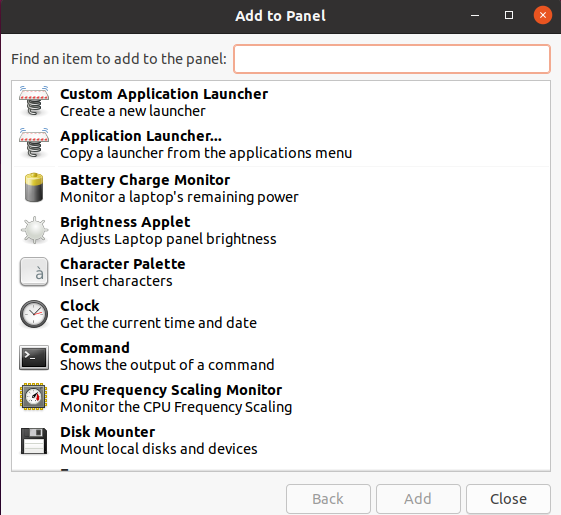
除此之外,你可以通过 ALT + 右键点击 顶部面板添加任意数量的旧版小程序。
经典 GNOME 的性能
首先,磁盘空间占用极小,仅安装 61 MB。我的测试使用了大约 28% 的内存,其中大部分被其他进程占用。猜猜是谁?是的,是 snap-store(又名 Ubuntu 软件)。
因此,总体而言,它非常轻巧,内存(仅 28 MB)和 CPU(0.1%)占用空间非常小。
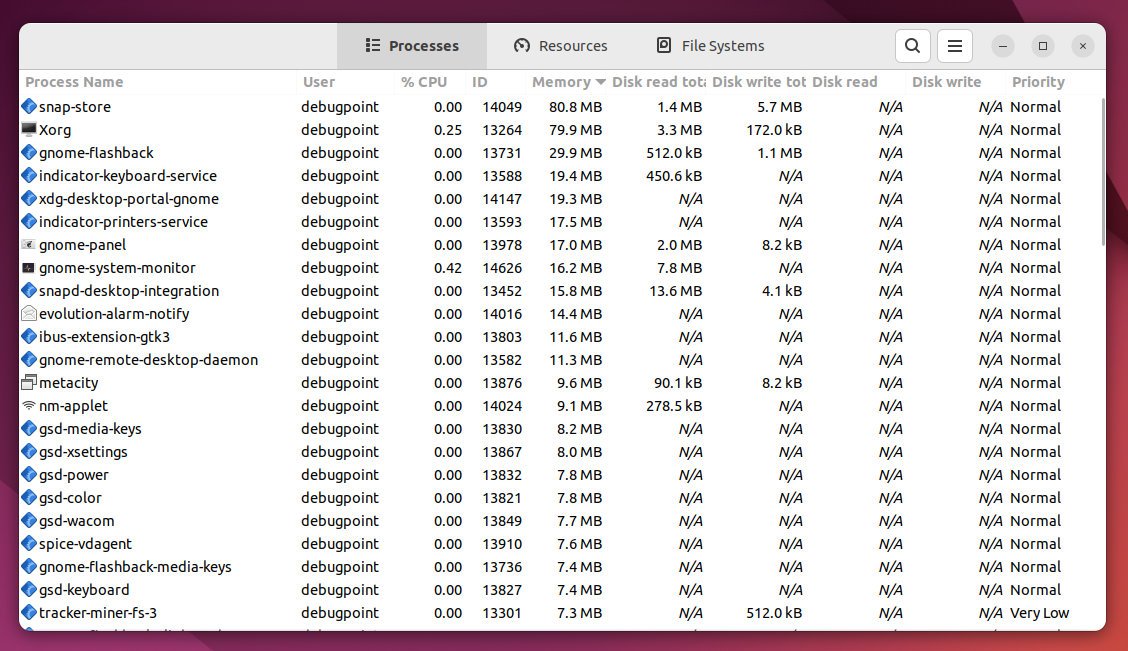
此外,假设你将其与同样使用相同技术的 Ubuntu MATE 进行比较。在这种情况下,它比 MATE 更轻量,因为你不需要任何额外的 MATE 应用及其用于通知、主题和其他附加资源的软件包。
结束语
我希望本指南在你决定在 Ubuntu 22.04 LTS Jammy Jellyfish 中安装经典 GNOME 之前帮助你获得必要的信息。
参考链接
Flutter error G5FE39F1E: Type 'UnmodifiableUint8ListView' not found
问题描述
原本在 macOS 开发的项目,现在 Windows 10 运行时报如下错误:
|
1 2 3 4 5 6 7 8 |
Building Windows application... /C:/Users/Administrator/AppData/Local/Pub/Cache/hosted/pub.flutter-io.cn/win32-5.5.0/lib/src/guid.dart(32,9): error G5FE39F1E: Type 'UnmodifiableUint8ListView' not found. [D:\Source\xxxx\build\windows\x64\flutter\flutter_assemble.vcxproj] /C:/Users/Administrator/AppData/Local/Pub/Cache/hosted/pub.flutter-io.cn/win32-5.5.0/lib/src/guid.dart(32,9): error G027421CC: 'UnmodifiableUint8ListView' isn't a type. [D:\Source\xxxx\build\windows\x64\flutter\flutter_assemble.vcxproj] /C:/Users/Administrator/AppData/Local/Pub/Cache/hosted/pub.flutter-io.cn/win32-5.5.0/lib/src/guid.dart(52,17): error G311314CC: Method not found: 'UnmodifiableUint8ListView'. [D:\Source\xxxx\build\windows\x64\flutter\flutter_assemble.vcxproj] /C:/Users/Administrator/AppData/Local/Pub/Cache/hosted/pub.flutter-io.cn/win32-5.5.0/lib/src/guid.dart(56,31): error G311314CC: Method not found: 'UnmodifiableUint8ListView'. [D:\Source\xxxx\build\windows\x64\flutter\flutter_assemble.vcxproj] /C:/Users/Administrator/AppData/Local/Pub/Cache/hosted/pub.flutter-io.cn/win32-5.5.0/lib/src/guid.dart(100,17): error G311314CC: Method not found: 'UnmodifiableUint8ListView'. [D:\Source\xxxx\build\windows\x64\flutter\flutter_assemble.vcxproj] D:\Program Files\Microsoft Visual Studio\2022\Community\MSBuild\Microsoft\VC\v170\Microsoft.CppCommon.targets(254,5): error MSB8066: “D:\Source\xxxx\build\windows\x64\CMakeFiles\3280cb0897b7497e569be324d43ba4f0\flutter_windows.dll.rule;D:\Source\xxxx\build\windows\x64\CMakeFiles\7cbe39a26ff33b9ec6d721697d74fbd8\flutter_assemble.rule”的自定义生成已退出,代码为 1。 [D:\Source\xxxx\build\windows\x64\flutter\flutter_assemble.vcxproj] Error: Build process failed. |
解决方法
|
1 2 3 4 5 6 7 8 9 |
$ flutter pub upgrade win32 $ flutter pub cache clean $ flutter channel stable $ flutter clean && flutter pub get $ flutter pub upgrade |